

Sort answer tables
When a chat answer contains a table, you can sort its rows by any column. Sorting happens in your browser and changes only what you see: the answer text, conversation memory and exports stay the same, and nothing is sent to the model or a database.
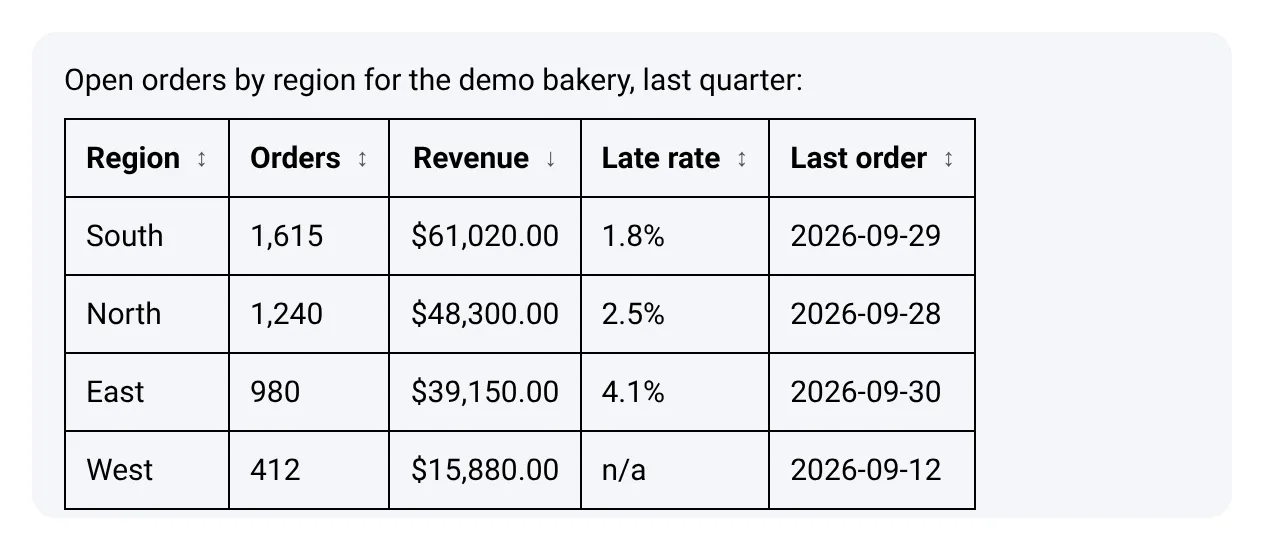
Sort a table
Section titled “Sort a table”- Click a column header, or move to it with Tab and press Enter or Space. The rows sort from low to high and the header shows ↑.
- Click the same header again to sort from high to low. The header shows ↓.
- Click another header to sort by that column instead.
Headers you can sort show ↕ until you use them. Until you click a header, the rows keep the order the answer gave them.
Screen readers announce each header as a button, for example Sort by Revenue, ascending, and the sorted column reports its direction.
Where it works
Section titled “Where it works”- The app chat: the canvas chat and the chat on a chatflow.
- Shared links and the embedded chat widget: once the answer has finished, so the table does not move while it is still being written. Each answer keeps its own sort. On a narrow screen, a wide table scrolls sideways.
A table can be sorted when it has one header row and every row has the same number of cells, with no merged cells. Other tables show as written. A header that is empty, or that holds a link or a button, is not sortable.
How values sort
Section titled “How values sort”The same order rules apply in the app and in the widget:
| Column holds | Sorted as |
|---|---|
Numbers, such as 1,240, $48,300.00, USD 15, 2.5% or (120) |
Numbers. A value in parentheses counts as negative. |
Dates written one way only, such as 2026-09-28, 12 Mar 2026 or Mar 12, 2026 |
Dates. A date such as 03/04/2026 can be read two ways, so it sorts as text. |
Risk labels, such as Low risk or High risk, under a header with the word risk |
Level, from No risk up to Critical risk. |
IDs and codes, under a header such as Order ID, Code, SKU, ZIP or Postal code |
Text, even when the values look like numbers. |
| Anything else | Text, ignoring case, with numbers inside the text in order (Item 2 before Item 10). |
A column sorts as numbers, dates or risk levels only when every filled-in value in it fits. Empty cells and values such as n/a, unknown, none or - always stay at the bottom, in both directions. Rows with equal values keep their original order.
Related
Section titled “Related”- Share and embed a chat. What else the shared chat and the widget show.
- Read the run card. The card above a harness answer.