

Turn real answers into tests
A question someone asked, and the rating they left on the answer, can become a row in a test set. That set is what the Publish dialog scores, and it is what can refuse Publish until the draft passes. This page walks that path on one chatflow. The field rules for datasets, evaluators, and the gate are in Evaluations. The check request is in Start a check.
Test with up to 100 question-and-answer pairs, with more on the roadmap. That is the default question cap, CUTTLELY_CHECK_COUNT_MAX. A dataset can hold more rows, and the check asks the first of those, up to that cap, in order.
Watch the testing run (56 seconds, sound on)
The examples use a made-up bakery chatflow, Bakery helper, and a dataset named Counter answers. The messages are sample text, not a real conversation.
Who can do this
Section titled “Who can do this”The organization owner can do every step. Anyone else needs the keys below. The full route list is in Roles and permissions.
| Step | Permission |
|---|---|
| Open View Messages | chatflows:view on a chatflow, a harness, or a pipeline. agentflows:view on an agentflow. assistants:view on an assistant. |
| Add to test set and Add rated answers to test set | datasets:create, or datasets:update together with datasets:view. The same view key as View Messages is also required. |
| The existing-dataset list in either dialog | datasets:view. Without it the list is hidden. New dataset stays available with datasets:create. |
| Run the Publish check on a dataset | Update permission for the flow, plus datasets:view. Ticking evaluators also needs evaluators:view. |
| Turn on Passing test set | chatflows:config on a chatflow, or agentflows:config on an agentflow. Configuration is hidden without that key. Turning it on also needs update permission for the flow, plus datasets:view and evaluators:view. Turning it off needs only the update permission. |
A role that can only update datasets does not see either button, because the dataset list needs datasets:view.
Find the rated answers
Section titled “Find the rated answers”- Open the chatflow canvas.
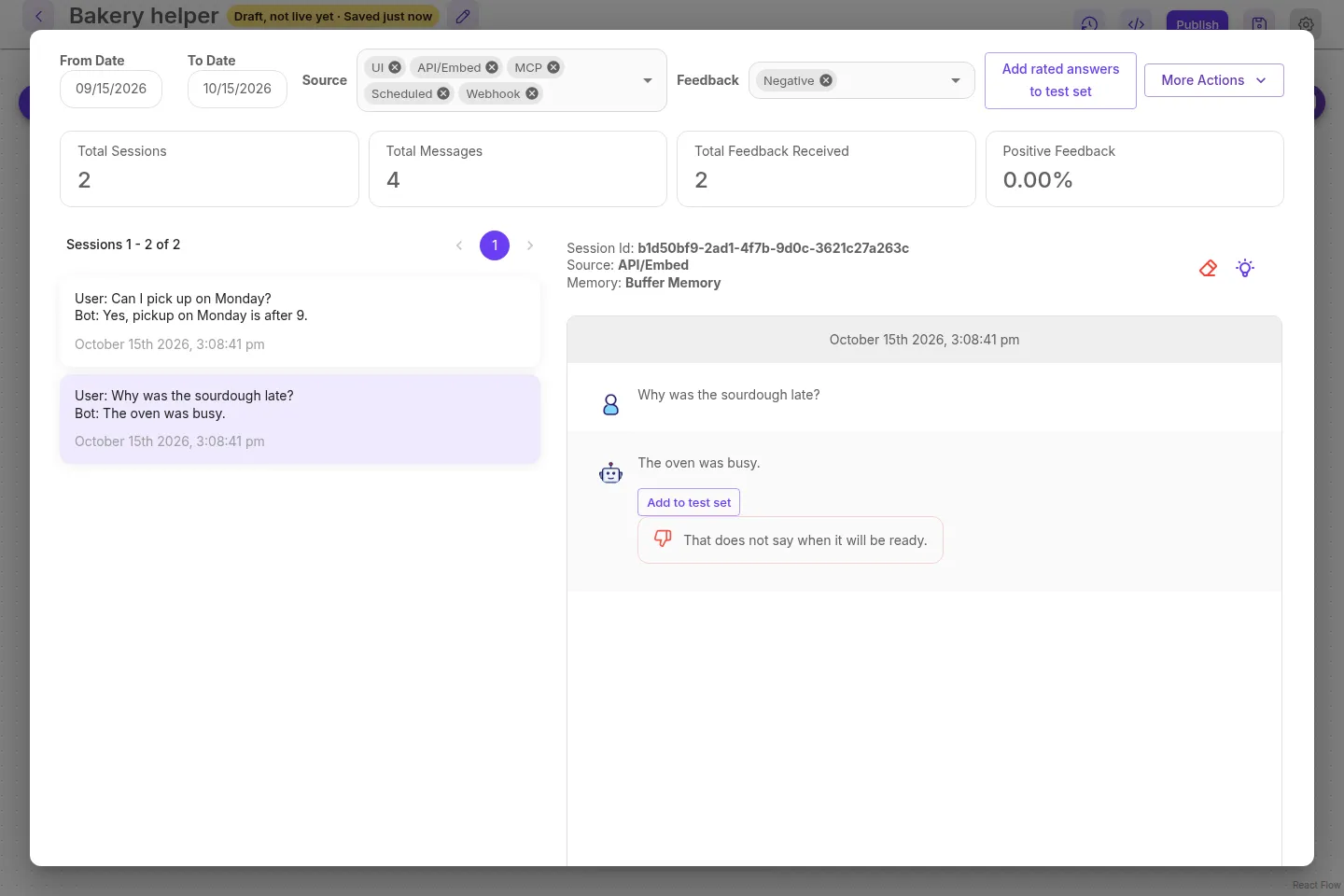
- Select Settings, the gear at the top right, then View Messages.
- Set Feedback to Negative only, or to Positive only.
Add rated answers to test set is shown when exactly one of those is selected. Both selected, or neither, hides it. Add to test set stays on each answer either way, when the role can save a row.
Add one answer
Section titled “Add one answer”Use this when one reply should become a row, including a reply you want to keep as the expected answer.
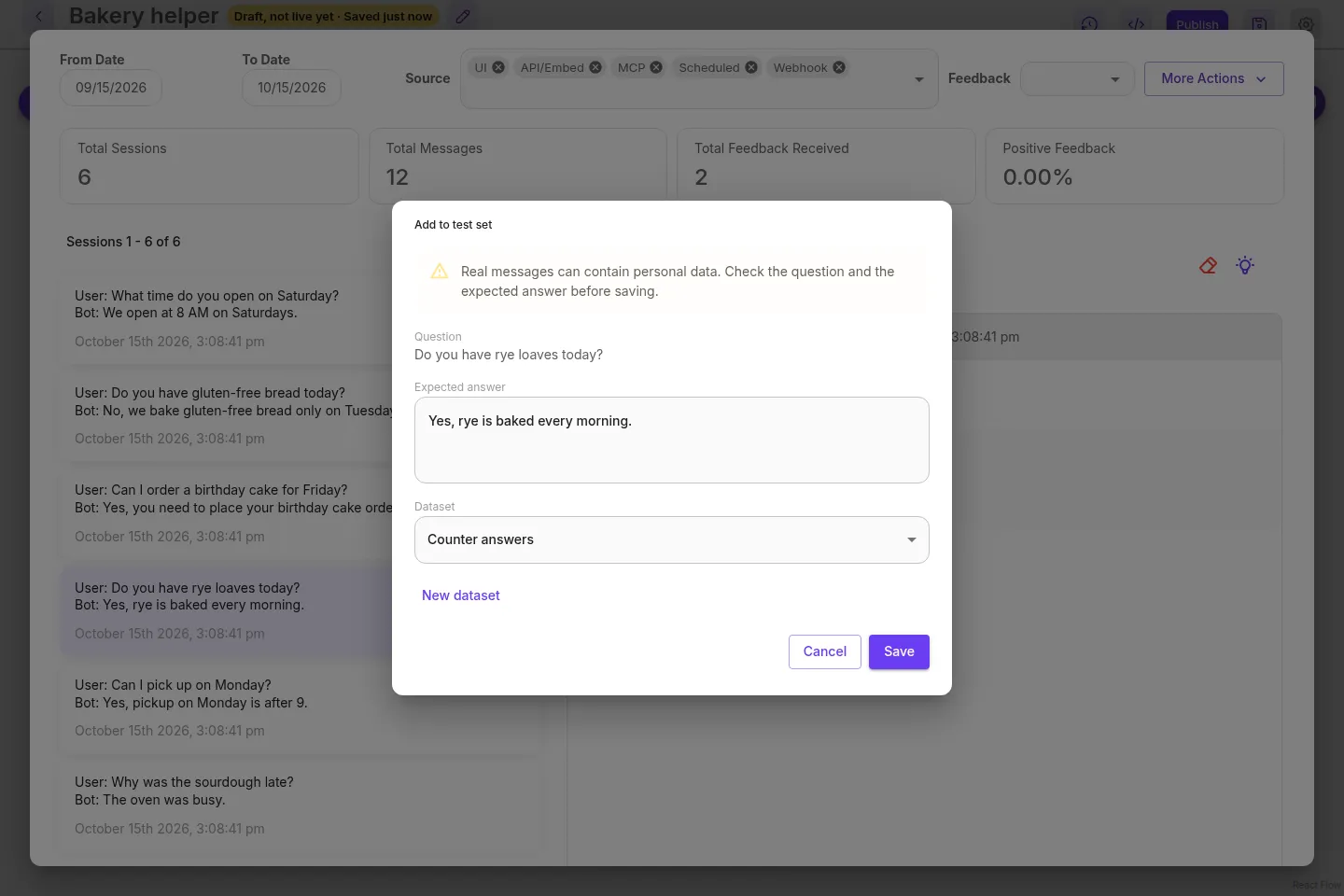
- On that answer, select Add to test set.
- Read Question. It is the message immediately before that answer in the same chat session. A question from another session, or another memory in that session, is not used. A second answer in a row has no question, and the dialog says
No question was found for this answer.Saving it is refused. - Expected answer starts as the reply that was given. Edit it when the check should expect something else.
- Choose a dataset, or select New dataset, type a name, and select Create dataset.
- Read the warning, check both texts, and select Save. The note says
Added to the test set.
The warning in the dialog is: Real messages can contain personal data. Check the question and the expected answer before saving. A real chat can include a name, an email, an order number, or anything else the person typed. Remove that before you save. The sample below is made up.
Saving that same answer into the same dataset again returns the row already stored. The flow and the dataset both have to belong to the current team. A flow or a dataset from another team is not found.
What is stored about that message
Section titled “What is stored about that message”The row keeps a short record of where the question came from. A row typed in or uploaded leaves these empty.
| Field | One saved answer |
|---|---|
sourceType |
chat_message |
sourceMessageId |
The answer’s message id |
sourceFlowId |
The flow id |
sourceDate |
The date of the answer |
input |
The question |
output |
The expected answer, after any edit in the dialog |
The rating, the feedback text, and the rejected answer stay empty on this row. Those are filled only when the row comes from a rating, below.
POST /api/v1/datasets/rows/from-message accepts datasets:create or datasets:update and also checks the view key for the flow. The body is datasetId, messageId, and output (the expected answer; omit it and the server uses the reply that was given).
| Status | When |
|---|---|
| 200 | The row was saved, or the same message was already in that dataset and the existing row is returned. |
| 400 | datasetId is required, messageId is required, output must be text, This message is not an answer., or No question was found for this answer. |
| 403 | You do not have permission to view this flow. |
| 404 | The dataset is missing or in another team (Dataset <id> not found), or the message is missing or its flow is in another team (Chat message <id> not found). |
Add the thumbs-down answers
Section titled “Add the thumbs-down answers”A thumbs-down is a reply someone rejected. The question belongs in the test set. The rejected reply is not the expected answer, so the row is saved with that field empty until you write one.
- In View Messages, set Feedback to Negative only.
- Select Add rated answers to test set.
- Last days is how far back to look, a whole number from 1 to 90. It starts at 7. The window uses the date of the rating.
- Limit is how many new rows this call may add. The dialog accepts a whole number from 1 to 500. Leave it blank and the call uses 500. A number outside that range disables See how many and Add Rated Answers.
- Choose the dataset, or create one with New dataset.
- Select See how many. That is a dry run. It shows how many rows would be added, how many are already in the dataset, and a short preview of the questions. It writes nothing.
- Select Add Rated Answers. One new row says
Added 1 rated answer to the test set. Any other count saysAdded N rated answers to the test set.
The warning in this dialog is: Real messages can contain personal data. Check the questions before adding them to a test set. The preview is the place to do that. Drop a question that should not be stored, by leaving that rating out of a later, narrower window, or by deleting the row after it is saved.
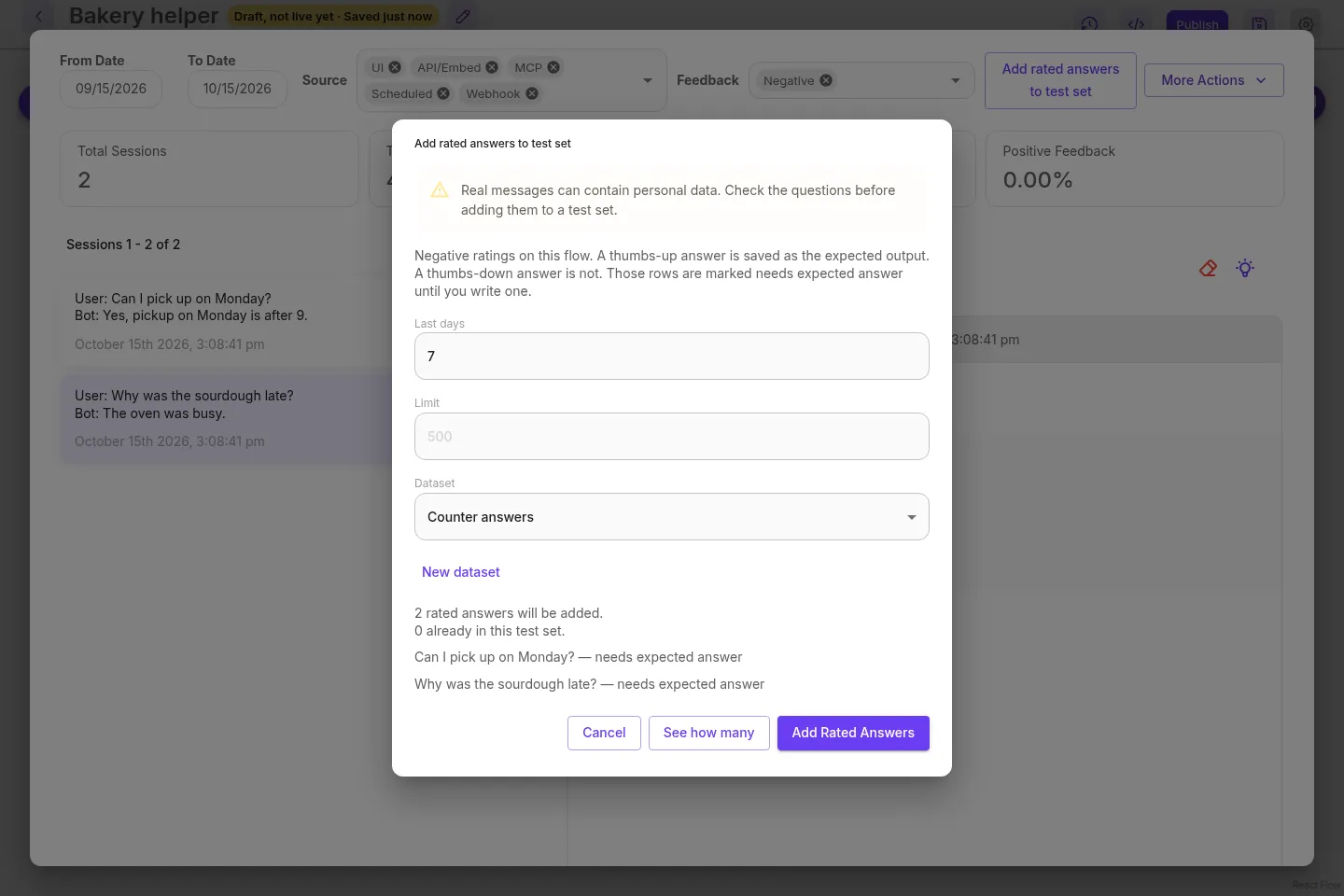
The dialog says Negative ratings on this flow. A thumbs-up answer is saved as the expected output. A thumbs-down answer is not. Those rows are marked needs expected answer until you write one. With Positive selected, it still says Positive ratings on this flow. A thumbs-up answer is saved as the expected output. The thumbs-down sentences are left out, and each row’s expected answer is the reply that was given.
See how many shows:
N rated answers will be added.(answerwhen the count is 1.)N already in this test set.- Up to five questions. A thumbs-down line ends with
— needs expected answer. Each question is cut at 160 characters. - When the scan stopped early:
The scan stopped before the whole window was read. Scan older ratings to continue.Scan older ratings continues from the oldest rating that scan read.
Add Rated Answers writes the ratings from that preview. A rating that arrives after See how many waits for the next time. The dialog stays open while the count, a new dataset, or the add is still running, and it cannot be closed until that finishes.
Newest ratings are taken first. The question is the message immediately before that answer in the same chat session, the same rule as Add to test set. A null session or memory matches only a null session or memory. An answer with no question of its own is left out. A message already in the dataset, including one saved with Add to test set, is skipped and counted in already in this test set. It does not use up the limit. A duplicate found while the rows are being written is skipped too, and the other new rows are still saved.
The scan reads at most 1,000 ratings, and it also stops when the limit is full. The cursor is the last rating that scan actually read, so a limit that stops partway through a page does not skip the rest of that page. Scan older ratings sends that cursor, and the next run starts strictly older than the stored time of that rating, including other ratings in the same millisecond. A window of exactly 1,000 ratings, with nothing older left, is not reported as stopped early. If the rating that starts the next page is removed before that page is read, the scan continues from the stored time, including fractions of a millisecond. The cursor is that rating’s stored time as text and its id. The time is YYYY-MM-DD HH:MM:SS with an optional fraction of up to 6 digits. A time such as 1, a time with a T between the date and the clock, or a day the month does not have, including 29 February when the year is not a leap year, is rejected. A rating that is already gone is not an error: the stored time is enough.
A write that omits the preview’s rating ids is rejected. It cannot send more ids than the limit. A cursor sent with those ids is still checked. A bad cursor is rejected. A good one does not choose the rows: the ids do.
What is stored about a rating
Section titled “What is stored about a rating”| Field | Thumbs-up | Thumbs-down |
|---|---|---|
sourceType |
chat_rating |
chat_rating |
sourceMessageId |
The answer’s message id | The answer’s message id |
sourceFlowId |
The flow id | The flow id |
sourceDate |
The date of the rating | The date of the rating |
sourceFeedbackId |
The feedback id | The feedback id |
sourceRating |
THUMBS_UP |
THUMBS_DOWN |
sourceFeedbackText |
The feedback text, when one was left | The feedback text, when one was left |
sourceRejectedAnswer |
Empty | The reply that was rejected |
needsExpectedAnswer |
false | true, until you save a non-empty expected answer |
input |
The question | The question |
output |
The reply, used as the expected answer | Empty |
POST /api/v1/datasets/rows/from-ratings accepts datasets:create or datasets:update and also checks the view key for the flow. The flow and the dataset both have to belong to the current team.
A dry run sends dryRun: true and does not send feedbackIds. The write sends dryRun: false and the feedbackIds from the preview.
| Field | Meaning |
|---|---|
datasetId |
The dataset. Required. |
flowId |
The flow whose ratings are copied. Required. |
rating |
THUMBS_UP or THUMBS_DOWN. Required. |
days |
A whole number from 1 to 90. Required. |
limit |
A whole number of at least 1. Omit it for 500. A larger number is capped at 500. |
dryRun |
true counts and previews. false writes. Omit it and the call writes, which still requires feedbackIds. |
cursor |
{ "createdDate", "id" } from the previous preview, to read older ratings. Pass it back unchanged. |
feedbackIds |
The rating ids from the preview. Required when dryRun is not true. |
The response is { "dryRun", "count", "skipped", "preview", "truncated", "cursor", "feedbackIds" }. preview lists input, output, rating, feedbackId, messageId, and needsExpectedAnswer. cursor is null when the window was read to the end. To read the next page, send that cursor object back exactly as it came. Do not parse it, reformat the time, or build one yourself: createdDate is the stored text, and a time in another form is rejected.
| Status | When |
|---|---|
| 200 | The dry run returned the count, or the write saved the new rows. count is how many were added. skipped is how many were already stored. |
| 400 | datasetId is required, flowId is required, rating must be THUMBS_UP or THUMBS_DOWN., days must be a whole number from 1 to 90., limit must be a whole number of at least 1., dryRun must be true or false., feedbackIds is required., feedbackIds must not be longer than the limit., feedbackIds must be a list of ids., or cursor must be a createdDate and an id. |
| 403 | You do not have permission to view this flow. |
| 404 | Dataset <id> not found or Flow <id> not found, including a record in another team. |
Fill in the expected answers
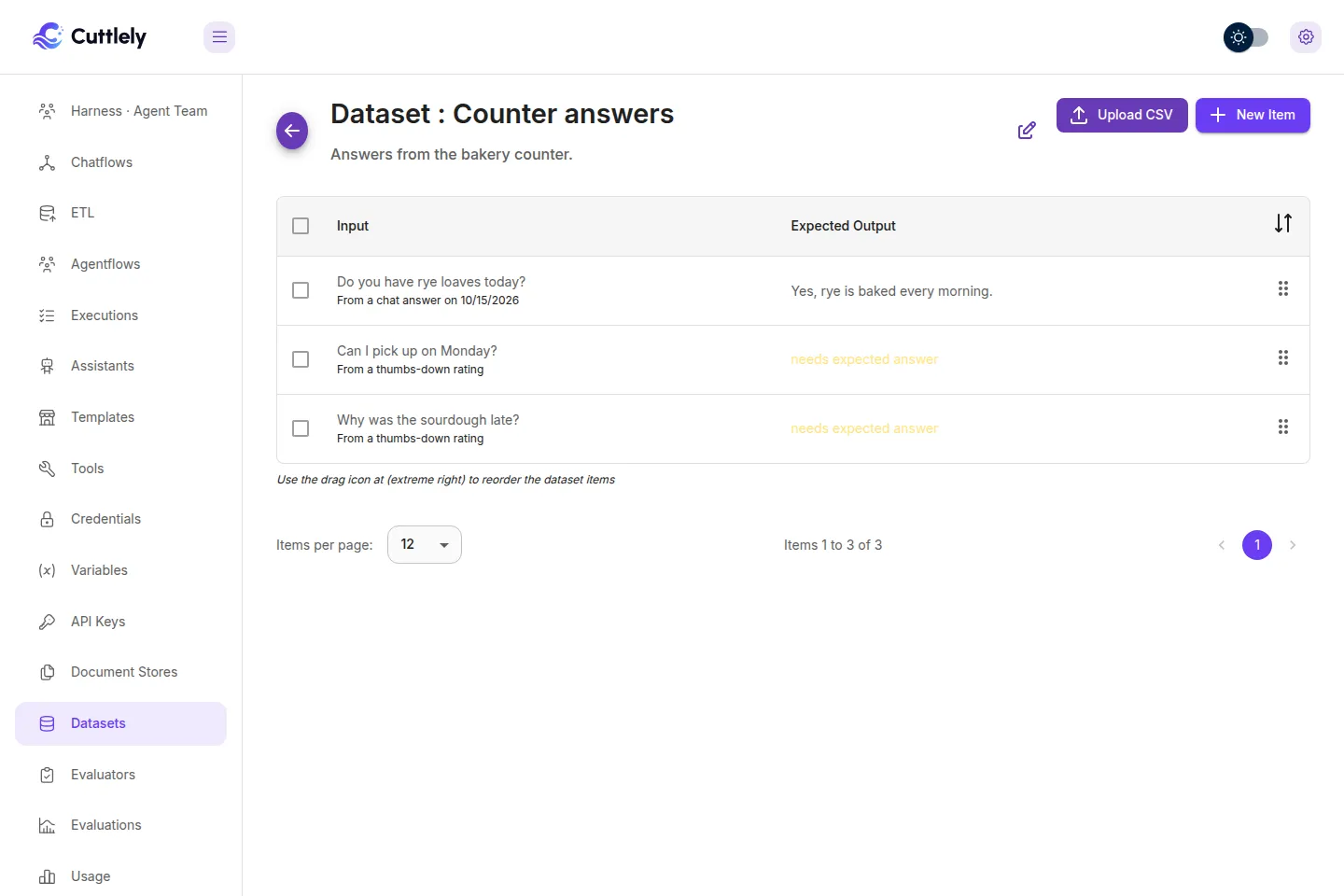
Section titled “Fill in the expected answers”Open the dataset. A thumbs-down row shows needs expected answer in the Expected Output column. Under the question, a row saved from one answer says From a chat answer on and the date. A row saved from a rating says From a thumbs-up rating or From a thumbs-down rating.
Open the row. The dialog title is Edit Item in, the dataset name, and Dataset. It says This row needs an expected answer. The rating is not a correct answer. When the row still has them, it also shows Rejected answer: and Feedback:. Type the answer the check should expect in Anticipated Output, then select Save. The table header for that column is Expected Output.
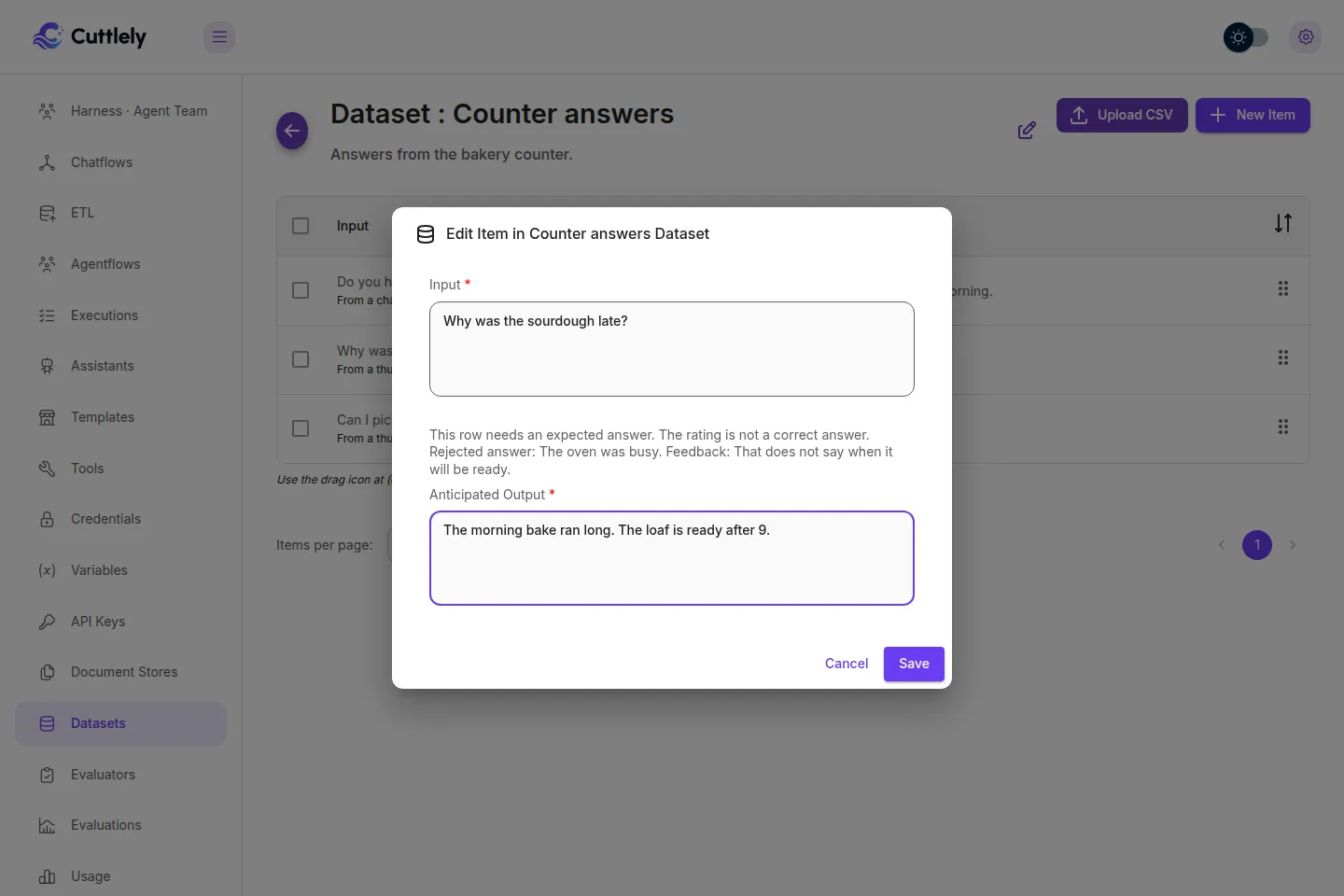
Type a non-empty expected answer, then select Save. That clears needs expected answer. Save stays disabled while Anticipated Output is empty, so the dialog cannot clear the field. A PUT /api/v1/datasets/rows/:id that sets output to a blank string on a thumbs-down row brings the marker back. The rejected answer and the feedback text stay on the row either way.
A row that still needs an expected answer is asked like any other row. Text, JSON, and numeric evaluators score the answer. A model evaluator scores Error with This row needs an expected answer. and the grading model is not called. Fill in the expected answer and run the check again.
Run the Publish check on that dataset
Section titled “Run the Publish check on that dataset”On a chatflow, or an agentflow that starts with Chat Input, the Publish dialog can ask this dataset instead of recent questions. A harness can ask it too. A harness check does not store a pass.
- Save a draft, then select Publish.
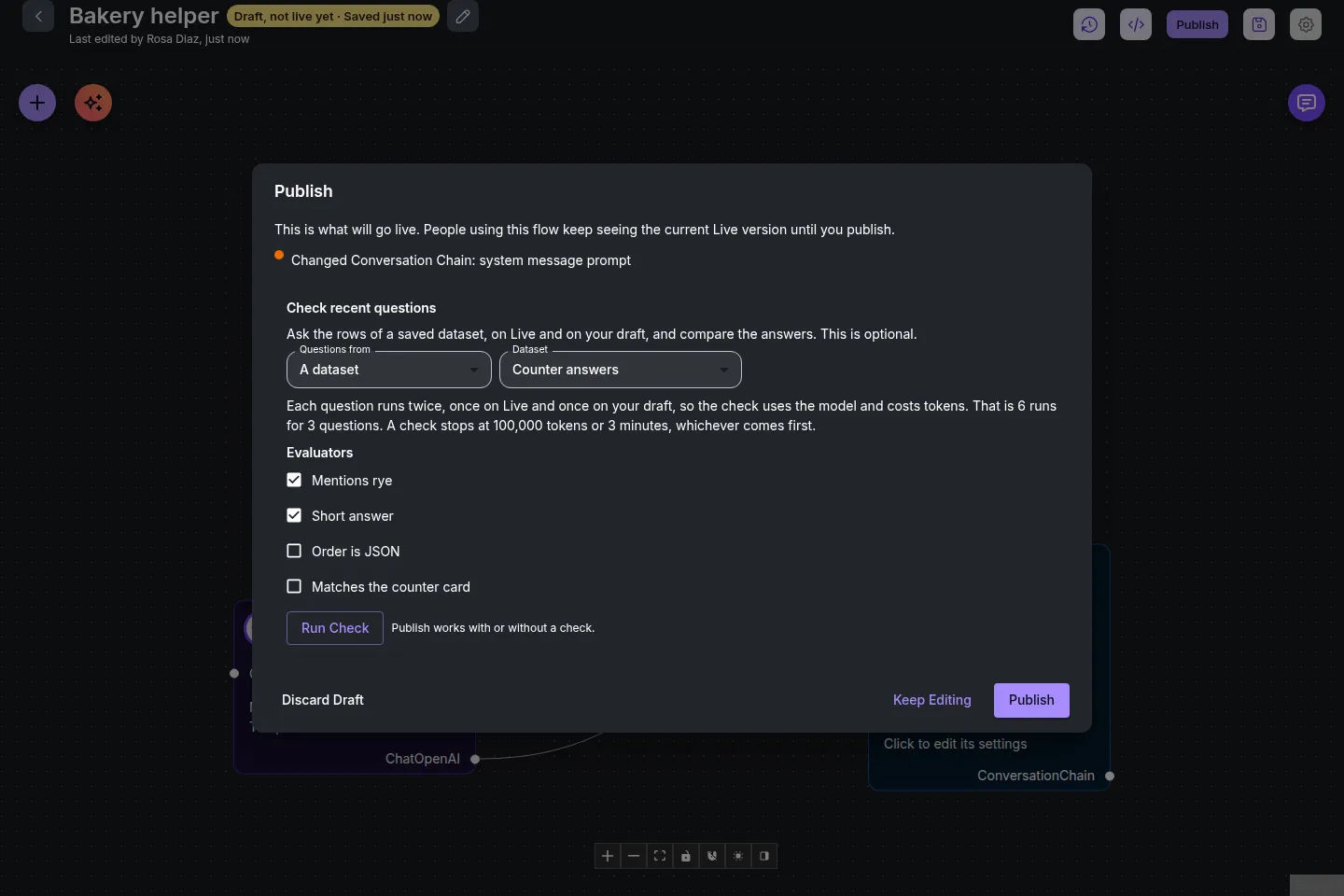
- Under Check recent questions, set Questions from to A dataset and choose Counter answers. Questions from is hidden when your role cannot view datasets.
- Tick the evaluators. That list is hidden when your role cannot view evaluators.
- Select Run check. The box keeps Run check when Passing test set is on. To clear the gate, select Run the test set in the notice under the box, which runs the saved dataset, evaluators and pass mark and updates Publish.
Each row runs in the saved order, once on Live and once on the draft. The expected answer is shown under the question. Each side shows Pass, Fail, or Error, and a pass rate. The finished check reports passed or failed for the draft against a pass mark. The mark is 100 unless the request sends threshold. What the scores mean, and the refusals for a form, webhook, or schedule start, are in Run the Publish check on a dataset.
Turn on the gate
Section titled “Turn on the gate”A chatflow, or an agentflow that starts with a chat message, can refuse Publish until the current draft passes this dataset.
- Open Settings, then Configuration. The dialog title is Chatflow Configuration. Select Passing test set.
- Choose Counter answers, tick the evaluators, and set Pass at. 100 means every score must pass. An errored score counts as not passed.
- Turn on Require a passing test set before Publish. The menu row shows ON. The note says
Publish is refused until this draft passes the dataset at the mark you set.Saving the switch also saysPublish waits for a passing test set.
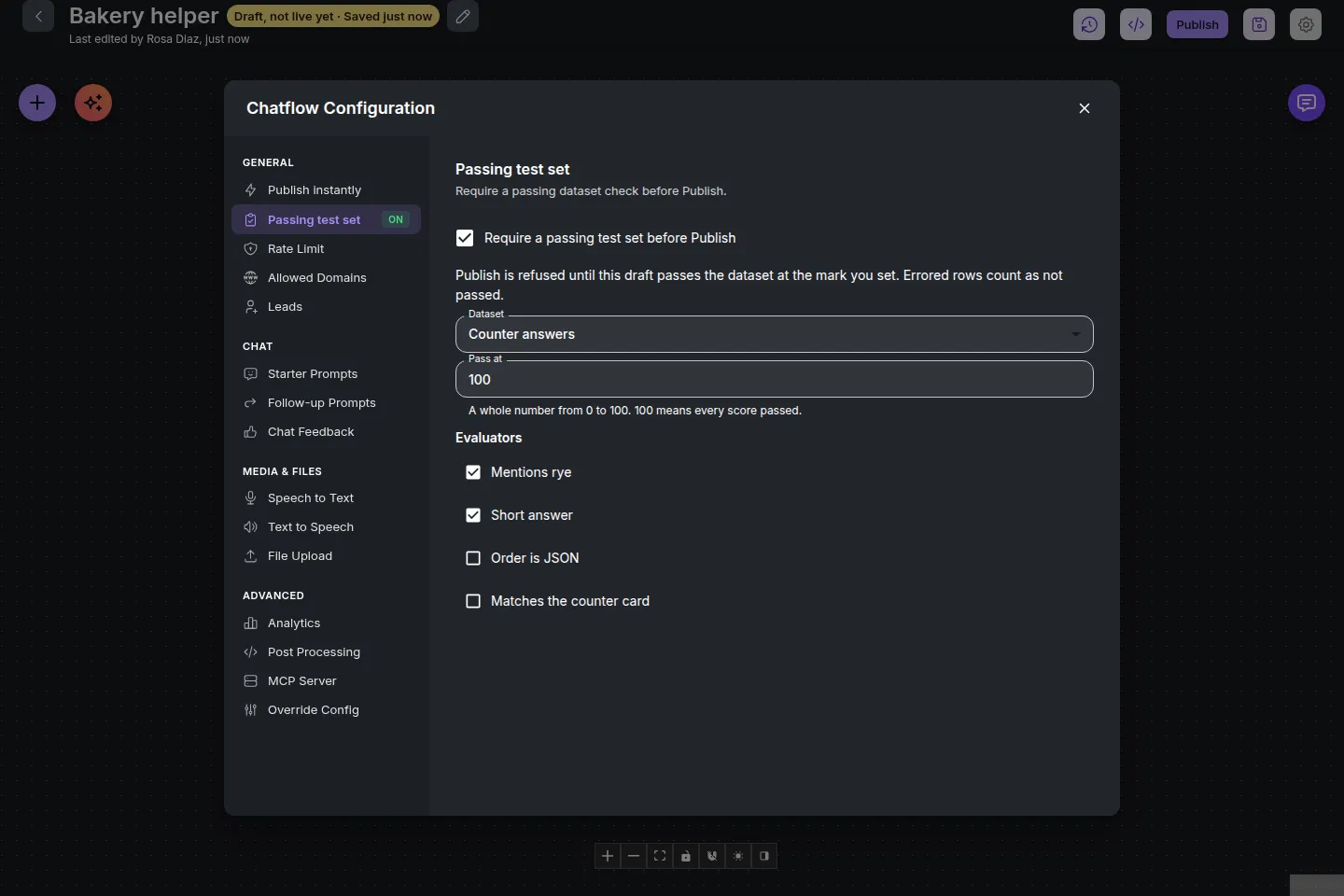
In the Publish dialog, Publish stays disabled, with the reason, until the latest result passed for this draft, these settings, the same rows, and the same answer post-processing. POST /api/v1/flow-drafts/<flow id>/publish returns 409 with that reason until then. The messages, and the starts that cannot use the gate, are in Set the pass mark and turn on the gate. The gate covers Publish of the current draft only, and the other ways of changing Live are in the table in Require a passing test set before you publish.
Fail the build on that gate
Section titled “Fail the build on that gate”Scored mode and --gate need Cuttlely 1.1.0 or later. 1.1.0 is the first release with scored mode. The published 1.0.3 package has no --gate.
With the passing test set on, a pipeline can run the same check and exit on the server’s verdict. The command, the exit codes, and the workflow are in Fail a build when answers change.