

Use the Cuttlely API in your own web app
Every chatflow, agentflow and harness you build in Cuttlely can answer questions for your own website or app. Your server sends the question to Cuttlely’s prediction API with an API key, and Cuttlely sends back the answer, either whole or token by token. This guide covers how to do that safely.
All outputs on this page come from real runs against a local Cuttlely server with the gpt-4.1-mini model, using a made-up bakery. Session tokens are replaced with <session token>.
- Before you start
- Create an API key
- Ask a chatflow
- Agentflows and harnesses
- Stream the answer
- Keep the conversation going
- Send a file with the question
- Change settings for one request
- Which version answers: Live, draft, Dev and Prod
- Errors, rate limits and allowed origins
- The example web app
- When to use the chat widget instead
Before you start
Section titled “Before you start”You need:
- A Cuttlely server. The examples use
$CUTTLELY_URL, for examplehttp://localhost:3000. - A flow that answers in the canvas chat, and has been published (see Which version answers). Its id is in the browser address bar on the canvas, and in API Endpoint (the
</>button at the top right of the canvas). The examples use$FLOW_ID. - An API key, in
$CUTTLELY_API_KEY.
Keep the API key on your server. Never put it in a web page, a mobile app or a public repository: anyone who has it can ask your flow questions on your model account. The example web app shows the pattern: the browser talks to your server, and only your server talks to Cuttlely.
Create an API key
Section titled “Create an API key”- In the sidebar, open API Keys and select Create Key.
- Give the key a name, such as
Bakery website, and choose at least one permission. Permissions decide what the key can do on Cuttlely’s management API (for examplechatflows:view). Asking a flow does not need a permission; see the next step. - Copy the key when it is shown. Cuttlely stores only a hash, so it cannot show the key again.
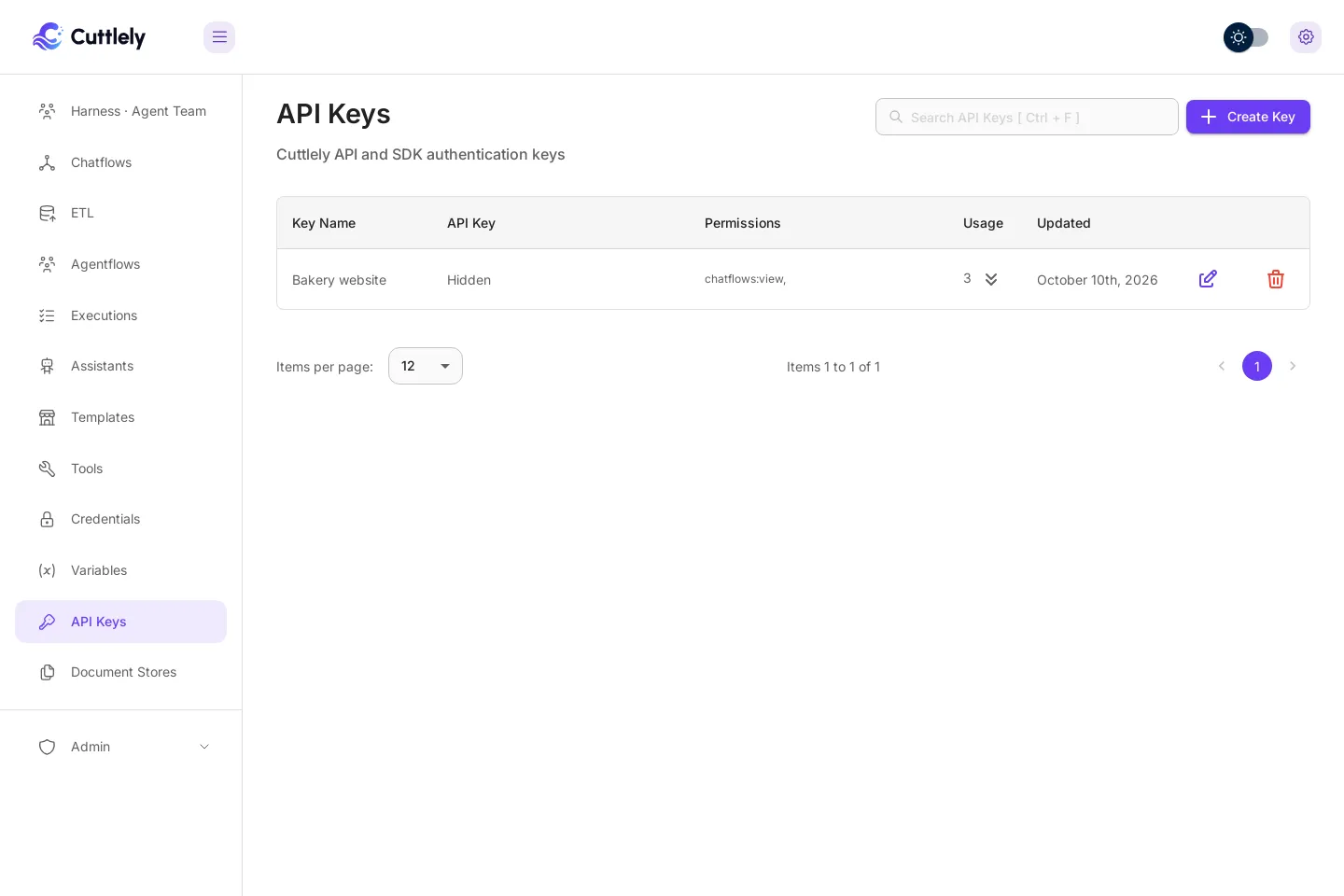
Then choose which flows the key can call. On each flow’s canvas, open API Endpoint (</>), and pick the key in the drop-down at the top right.
- A flow with a key answers only requests that send that key as
Authorization: Bearer <key>. - A flow with “No Authorization” answers anyone who knows its id. Use that only for flows you mean to be public, such as one behind the chat widget.
A request without the key, or with the wrong one, gets 401:
curl -s "$CUTTLELY_URL/api/v1/prediction/$FLOW_ID" \ -H 'Authorization: Bearer not-a-real-key' \ -H 'Content-Type: application/json' \ -d '{"question":"hi"}'{ "statusCode": 401, "success": false, "message": "Unauthorized", "stack": {} }Ask a chatflow
Section titled “Ask a chatflow”POST /api/v1/prediction/<flow id> with a JSON body. question is the only required field.
curl -s "$CUTTLELY_URL/api/v1/prediction/$FLOW_ID" \ -H "Authorization: Bearer $CUTTLELY_API_KEY" \ -H 'Content-Type: application/json' \ -d '{"question":"What time do you open on Saturday?"}'{ "text": "We open at 7:00 on Saturday.", "question": "What time do you open on Saturday?", "chatId": "e1a548e9-20b6-427d-ac51-f2e85e67c7eb", "chatMessageId": "553ffb4a-faea-434d-b624-cf1aa660c604", "isStreamValid": false, "sessionId": "e1a548e9-20b6-427d-ac51-f2e85e67c7eb", "memoryType": "Buffer Memory", "sessionToken": "<session token>"}text is the answer. chatId and sessionToken continue the conversation; see Keep the conversation going.
Agentflows and harnesses
Section titled “Agentflows and harnesses”The same route serves every kind of flow. Only the flow id changes.
An agentflow returns the answer in text, plus executionId and agentFlowExecutedData, one entry per step that ran:
curl -s "$CUTTLELY_URL/api/v1/prediction/$AGENTFLOW_ID" \ -H "Authorization: Bearer $CUTTLELY_API_KEY" \ -H 'Content-Type: application/json' \ -d '{"question":"I would like a chocolate cake for Saturday, please."}'"text": "You'd like a chocolate cake for pickup on Saturday; please note we need 48 hours' notice for custom cakes.""agentFlowExecutedData": [{"nodeId":"startAgentflow_0","nodeLabel":"Start", ...}, {"nodeId":"llmAgentflow_0", ...}]A harness (an agent team) is called through a chatflow that holds one Harness card set to the harness’s name. Build it as in Call the harness from a chatflow, bind your key to that chatflow, and call its id. The harness page’s own route, POST /api/v1/harnesses/<name>/runs, uses a signed-in session and does not take an API key.
curl -s "$CUTTLELY_URL/api/v1/prediction/$HARNESS_CHATFLOW_ID" \ -H "Authorization: Bearer $CUTTLELY_API_KEY" \ -H 'Content-Type: application/json' \ -d '{"question":"Can I pick up a gluten-free loaf on Monday?"}'The response has text, and also harness, agents (which specialists ran), sources, artifacts, timings and report:
"text": "You cannot pick up a gluten-free loaf on Monday because Rosa's Bakery is closed that day. Gluten-free loaves are available only on Tuesdays and Fridays from 7:00 to 15:00.""harness": "bakery-team""agents": [{"name":"orders","status":"completed","ms":1143,"task":"Can I pick up a gluten-free loaf on Monday?","model":"ChatOpenAI · gpt-4.1-mini","tokens":{"prompt":129,"completion":52,"cached":0}}]"timings": {"routeMs":855,"specialistsMs":1145,"handoffMs":787}Stream the answer
Section titled “Stream the answer”Add "streaming": true and Cuttlely answers with server-sent events (Content-Type: text/event-stream) as the model writes. Each event is two lines and a blank line. The JSON on the data: line has an event name and its data:
curl -sN "$CUTTLELY_URL/api/v1/prediction/$FLOW_ID" \ -H "Authorization: Bearer $CUTTLELY_API_KEY" \ -H 'Content-Type: application/json' \ -d '{"question":"Do you have rye bread today? Today is Wednesday.","streaming":true}'message:data:{"event":"start","data":""}
message:data:{"event":"token","data":"Yes"}
message:data:{"event":"token","data":","}
message:data:{"event":"token","data":" we"}
...
message:data:{"event":"token","data":"."}
message:data:{"event":"metadata","data":{"chatId":"c93448cb-bb1f-4305-938f-bab00980a01b","chatMessageId":"2336eadb-3a42-4fed-8a0d-d5bf17c9885c","question":"Do you have rye bread today? Today is Wednesday.","sessionId":"c93448cb-bb1f-4305-938f-bab00980a01b","memoryType":"Buffer Memory"}}
message:data:{"event":"end","data":"[DONE]"}Join the token events for the answer (“Yes, we have rye bread today since it’s Wednesday.”). The events each kind of flow sends:
| Flow | Events, in order |
|---|---|
| Chatflow | start, token (many), metadata, end |
| Agentflow | agentFlowEvent, nextAgentFlow and agentFlowExecutedData as steps run, token, calledTools, usageMetadata, metadata, end |
| Harness | harness.route, harness.specialist and harness.partial while specialists work, harness.handoff, start, token, harness.final, metadata, end |
An error event carries a message when the run fails after streaming started. Ignore events you do not use; new ones can be added.
JavaScript (fetch)
Section titled “JavaScript (fetch)”This runs in Node 18 or newer, or in a browser page served by your own server:
const res = await fetch(`${process.env.CUTTLELY_URL}/api/v1/prediction/${process.env.FLOW_ID}`, { method: 'POST', headers: { 'Content-Type': 'application/json', Authorization: `Bearer ${process.env.CUTTLELY_API_KEY}` }, body: JSON.stringify({ question: 'Which days do you bake gluten-free loaves?', streaming: true })})if (!res.ok) throw new Error(`Cuttlely answered ${res.status}`)const reader = res.body.getReader()const decoder = new TextDecoder()let buffer = ''let answer = ''for (;;) { const { done, value } = await reader.read() if (done) break buffer += decoder.decode(value, { stream: true }) const blocks = buffer.split('\n\n') buffer = blocks.pop() // keep a half-received event for the next chunk for (const block of blocks) { const line = block.split('\n').find((l) => l.startsWith('data:')) if (!line) continue const { event, data } = JSON.parse(line.slice(5)) if (event === 'token') answer += data if (event === 'metadata') console.info('chatId:', data.chatId) if (event === 'error') throw new Error(data) }}console.info('answer:', answer)chatId: 7c4d51e5-837b-418d-a0e1-91491501effaanswer: We bake gluten-free loaves on Tuesdays and Fridays. Happy baking!Python
Section titled “Python”Standard library only:
import json, os, urllib.request
req = urllib.request.Request(    f"{os.environ['CUTTLELY_URL']}/api/v1/prediction/{os.environ['FLOW_ID']}",    data=json.dumps({"question": "How much notice do you need for a custom cake?", "streaming": True}).encode(),    headers={"Content-Type": "application/json", "Authorization": f"Bearer {os.environ['CUTTLELY_API_KEY']}"},    method="POST",)answer = ""with urllib.request.urlopen(req) as res:    for raw in res:  # one line at a time        line = raw.decode().strip()        if not line.startswith("data:"):            continue        event = json.loads(line[5:])        if event["event"] == "token":            answer += event["data"]            print(event["data"], end="", flush=True)        elif event["event"] == "metadata":            chat_id = event["data"]["chatId"]print("\nchatId:", chat_id)
We need 48 hours' notice for a custom cake.chatId: 415c7f11-4262-440a-a5c5-72b847794bceKeep the conversation going
Section titled “Keep the conversation going”A flow with memory (for example a Buffer Memory card) remembers earlier questions in the same conversation. Cuttlely picks the conversation id, not your app: the first answer returns a new chatId and a sessionToken that proves the conversation is yours. Send both back with the next question.
curl -s "$CUTTLELY_URL/api/v1/prediction/$FLOW_ID" \ -H "Authorization: Bearer $CUTTLELY_API_KEY" \ -H 'Content-Type: application/json' \ -d '{"question":"My name is Sam. I want two croissants."}'"text": "Hello Sam! Two croissants will be 7.00. Would you like to pick them up today?""chatId": "5e4c0ed8-c1f1-4be5-bb28-c8bd4782b4e2""sessionToken": "<session token>"curl -s "$CUTTLELY_URL/api/v1/prediction/$FLOW_ID" \ -H "Authorization: Bearer $CUTTLELY_API_KEY" \ -H 'Content-Type: application/json' \ -d '{"question":"What is my name, and how much do I owe?", "chatId":"5e4c0ed8-c1f1-4be5-bb28-c8bd4782b4e2", "sessionToken":"<session token>"}'"text": "Your name is Sam, and you owe 7.00 for two croissants.""chatId": "5e4c0ed8-c1f1-4be5-bb28-c8bd4782b4e2"The same chatId without its token, or an id your app made up, starts a new conversation with a new chatId. That keeps one visitor from reading another’s chat:
"text": "I don't know your name based on the information provided.""chatId": "7c915f06-ac82-4002-a5e3-776b73cda2f2"You can send the token in the body (sessionToken) or in the x-cuttlely-session-token header. A streamed answer does not include the token in its events. It comes in a cookie instead: Set-Cookie: cuttlely_session=<chat id>.<token>; Path=/api/v1; HttpOnly; SameSite=Lax. Either send that cookie back (curl -c jar -b jar), or read the token from it and send it in the header. Both were run:
# first question, streamed: keep the cookiecurl -sN -c jar -b jar "$CUTTLELY_URL/api/v1/prediction/$FLOW_ID" -H "Authorization: Bearer $CUTTLELY_API_KEY" \ -H 'Content-Type: application/json' -d '{"question":"I am Priya. Please note I need a cake for Saturday.","streaming":true}'# next question: the chatId from the metadata event, and the same cookie jarcurl -sN -c jar -b jar "$CUTTLELY_URL/api/v1/prediction/$FLOW_ID" -H "Authorization: Bearer $CUTTLELY_API_KEY" \ -H 'Content-Type: application/json' -d '{"question":"What is my name and what did I ask for?","chatId":"<chatId>","streaming":true}'Hi Priya, please place your custom cake order by Thursday to allow the required 48 hours notice.Your name is Priya, and you asked for a cake for Saturday.Keep the token on your server, next to your own session for that visitor, as the example web app does.
Send a file with the question
Section titled “Send a file with the question”Send multipart/form-data with the question in question and the file in files. Cuttlely reads text from documents (text, PDF, Word, spreadsheets and similar) and gives it to the flow with the question. Turn on file uploads for the flow first: Configuration, File Upload, Enable Full File Upload. A document over 25 MB is refused with 400, and the flow’s allowed file types (in the same settings) apply.
curl -s "$CUTTLELY_URL/api/v1/prediction/$FLOW_ID" \ -H "Authorization: Bearer $CUTTLELY_API_KEY" \ -F 'question=What is the Sunday special and its price?' \ -F 'files=@specials.txt;type=text/plain'specials.txt held three lines: the weekend specials, Saturday: cardamom buns, 4.00 each and Sunday: apple galette, 22.00 whole.
"text": "The Sunday special is an apple galette, priced at 22.00 for a whole galette."Images and audio go to cards that accept them, such as a chat model with image uploads turned on. For harnesses, see Prediction API in the harness guide.
The server takes only the uploads the flow accepts, the same ones its chat shows upload buttons for: images when a card has image uploads on, audio when Speech to Text is on, documents when file uploads are on, and chat files of the types a vector store with file upload takes. Anything else is refused before it is stored. An upload kind that is off gets 403 (Image uploads are not turned on for this flow), and a file type the flow does not take gets 400 (File type 'image/svg+xml' is not allowed for this flow). A file for a document loader input you allowed in Override Config is still taken.
Files in an Agent’s answer
Section titled “Files in an Agent’s answer”When an Agent card makes a file (a chart, a spreadsheet, a report), its answer links to it at /api/v1/get-upload-file. The link is signed: it carries expires and signature, so it opens without the API key, for that one file in that conversation of that flow, for 15 minutes. Pass it on to your user as it is. Changing any part of it, or opening it after 15 minutes, gives 401. To fetch the file later, call the same address without expires and signature from your server, with the API key and the conversation’s session token. The signature uses a secret the server makes on first start, so there is nothing to set up.
Change settings for one request
Section titled “Change settings for one request”overrideConfig changes a flow’s settings for one request, but only the settings the flow’s owner allowed. Turn it on in the canvas under Configuration, Advanced, Override Config, and pick each setting a request may change. Credentials, URLs, code and file inputs can never be changed this way. The full rules are in Override configuration.
The same request, before and after the owner allowed System Message on the Conversation Chain card:
curl -s "$CUTTLELY_URL/api/v1/prediction/$FLOW_ID" \ -H "Authorization: Bearer $CUTTLELY_API_KEY" \ -H 'Content-Type: application/json' \ -d '{"question":"When are you open on Sunday?", "overrideConfig":{"systemMessagePrompt":"You are the helper for Rosa'\''s Bakery. Open Tuesday to Sunday, 7:00 to 15:00, closed Mondays. Always answer in Spanish, in one sentence."}}'not allowed: "text": "We are open on Sunday from 7:00 to 15:00."allowed: "text": "Estamos abiertos el domingo de 7:00 a 15:00."A setting that is not allowed is ignored, not refused, and the server logs the ignored names. If your app takes input from visitors, decide on your server what goes into overrideConfig; never pass a visitor’s JSON through.
Which version answers: Live, draft, Dev and Prod
Section titled “Which version answers: Live, draft, Dev and Prod”The API always runs a flow’s Live version. Saving on the canvas makes a draft, which only the canvas test chat uses, until you select Publish. A new flow serves nothing until its first Publish. The same is true for embeds, shared links, schedules and webhooks. See Drafts and Publish.
Here a draft added “End every answer with: Happy baking!” to the system message:
after saving the draft: "Yes, we have croissants available every day we're open."after Publish: "Yes, we have croissants available every day we're open, priced at 3.50 each. Happy baking!"With two servers, a flow promoted from Dev to Prod is a separate flow on Prod with its own id, and Prod keeps its own credentials and API keys. Point your app’s Prod settings at the Prod server, the Prod flow id and a key made on Prod. See Move a flow from Dev to Prod.
Errors, rate limits and allowed origins
Section titled “Errors, rate limits and allowed origins”Errors come back as JSON with a status code:
| Status | When | Body (from real runs) |
|---|---|---|
| 400 | A bad request, such as a file over 25 MB or a type the flow refuses | message says what to fix |
| 401 | No key, or the wrong key | {"statusCode":401,"success":false,"message":"Unauthorized","stack":{}} |
| 403 | The request’s Origin is not on the flow’s allowed list |
{"statusCode":403,"success":false,"message":"This site is not allowed to use the bakery helper.","stack":{}} |
| 404 | No flow with that id | {"statusCode":404,"success":false,"message":"Chatflow 00000000-0000-4000-8000-000000000000 not found","stack":{}} |
| 429 | The flow’s rate limit was reached, or the model provider kept refusing with 429 | The flow’s limit message, as plain text; for the provider, message says how long to wait |
| 500 | The flow failed while it ran | message describes the failure |
| 503 | The server is restarting or shutting down | {"statusCode":503,"success":false,"message":"Cuttlely is restarting. Try again in a minute.","code":"UNAVAILABLE"} |
Show your visitors a short message of your own, not Cuttlely’s: an error message can name your flow or settings.
A 503 comes with Retry-After: send the request again after that many seconds. A streamed answer that was still running when the server had to stop ends with an error event carrying "status":503 and "code":"UNAVAILABLE".
Rate limits. In the flow’s Configuration (settings menu on the canvas), Rate Limit sets how many requests one client may send in a time window, and the message to send back. With 2 requests per 60 seconds, the third request got:
HTTP/1.1 429 Too Many RequestsX-RateLimit-Limit: 2X-RateLimit-Remaining: 0Retry-After: 59Content-Type: text/html; charset=utf-8
Too many questions at once. Please wait a minute and try again.
When the model provider (OpenAI, Anthropic and so on) keeps answering 429, Cuttlely tries the call up to 3 times within about 20 seconds, then answers 429 with Retry-After: the provider’s own wait when it sent one, otherwise 30 seconds. A streamed answer ends with an error event carrying "status":429, "code":"RATE_LIMITED" and "retryAfter" in seconds. A provider account that is out of credit is not a rate limit and still fails with 500.
Wait for Retry-After seconds before trying again. The flow’s limit counts by client address, so all requests from your server share one limit: set it for your whole site’s traffic, and rate-limit visitors on your own server.
Allowed origins (CORS). A browser sends an Origin header; a server does not. Allowed Domains, next to Rate Limit in the flow’s Configuration, lists the sites whose pages may call it. A request with another origin gets 403, and a listed origin gets the CORS header the browser needs:
Origin: https://other-site.example -> HTTP/1.1 403 ForbiddenOrigin: https://rosas-bakery.example -> HTTP/1.1 200 OK Access-Control-Allow-Origin: https://rosas-bakery.exampleA request with no Origin, such as one from your server, is not checked against the list, so the list does not replace the API key. The CORS_ORIGINS environment variable on the Cuttlely server adds origins allowed for every flow.
The example web app
Section titled “The example web app”examples/web-app is a small bakery helper: a plain HTML and JavaScript page, and a Node server with no dependencies. The page sends the question to the app’s own /api/ask. The server adds the API key, asks Cuttlely with streaming on, and passes the events through. It also keeps each visitor’s Cuttlely chatId and session token, so the browser holds neither the key nor the token, only the app’s own conversation id.
cd examples/web-appCUTTLELY_URL=http://localhost:3000 CUTTLELY_FLOW_ID=<flow id> CUTTLELY_API_KEY=<key> node server.mjs# Bakery helper on http://localhost:8080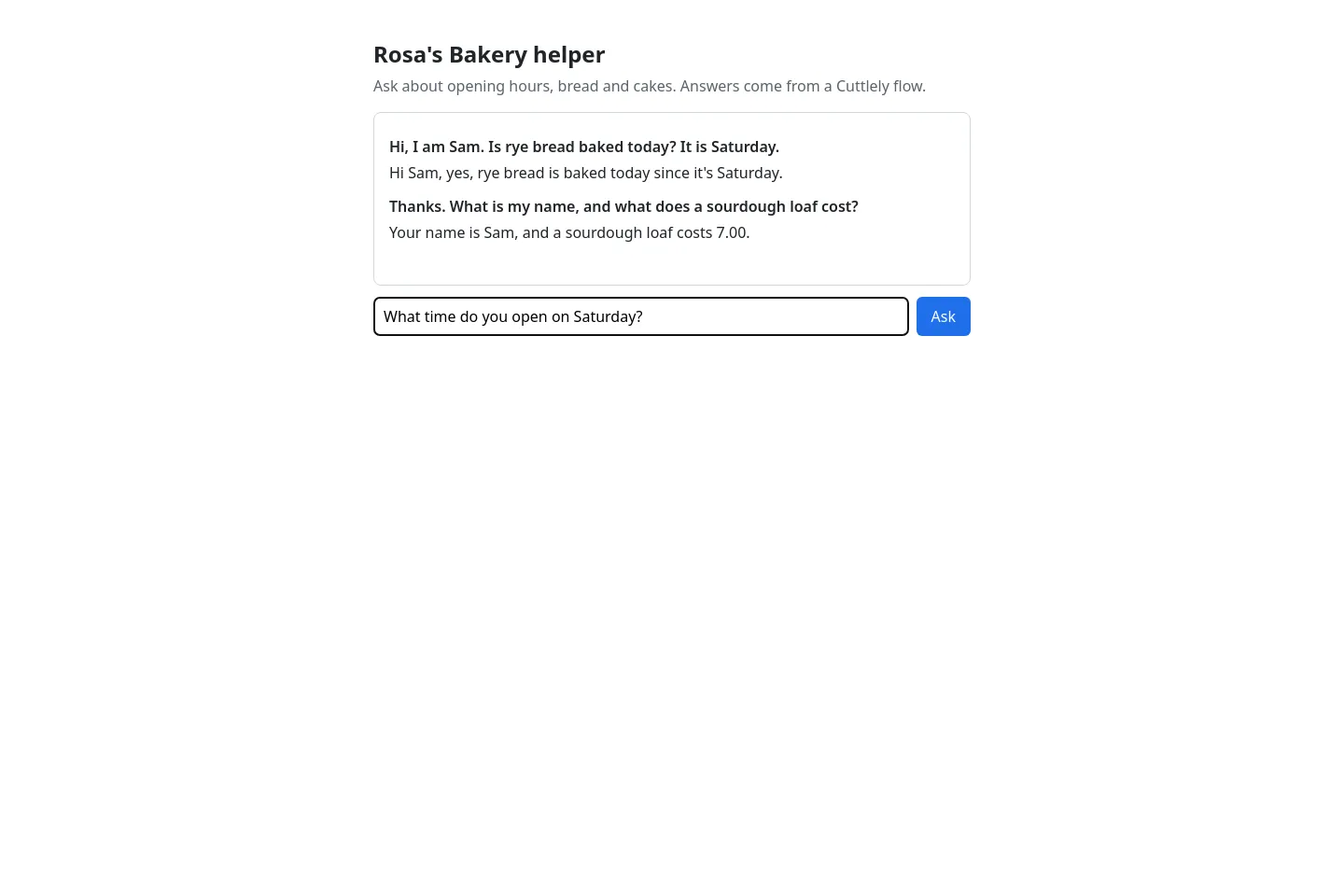
The server also refuses empty or very long questions, never forwards overrideConfig or other fields from the browser, and turns Cuttlely’s errors into a short message (429 stays 429). Its tests run with node --test examples/web-app/server.test.mjs and are part of pnpm verify.
When to use the chat widget instead
Section titled “When to use the chat widget instead”If you want a chat bubble on your site and do not need your own interface, use Cuttlely’s chat widget instead of the API. It needs no server code, but the flow behind it must be public (“No Authorization”), so protect it with Allowed Domains and a rate limit. Open API Endpoint (</>) on the canvas and choose Embed or Share Chatbot. Build your own app with the API when you need the key kept private, your own design, your own sign-in, or to combine the answer with other data. The sharing guide walks through the shared link, the embed snippet, Allowed Domains and troubleshooting.