

Give your app a scoped access key
Use an access key when your server calls a private Cuttlely flow. This guide creates a key for one flow, calls it, then rotates and revokes the key. Access keys are inbound credentials, not provider secrets in Credentials or public share/embed links. Keep them on your server, never in browser code, a screenshot, a URL or a shared terminal transcript.
Before you start
Section titled “Before you start”You need a signed-in workspace account allowed to manage keys and grant the selected operations and resources. A key cannot create another key. You also need a published Chatflow, Agentflow or Harness and its ID. If it calls a Harness, include that Harness too.
Scoped keys require enforcement On. Enforcement is Off by default; installing or upgrading does not turn it on. Do not activate it on a live installation to follow this guide. Have the instance operator complete the rollout below in a restored test installation first, then schedule production activation separately.
Legacy installations without an actual host binding use Admin > Server settings > Instance operator for an explicit one-time claim with a code printed only to the host log. Only verified host CLI bindings grandfather automatically; no legacy account, login method or owner role is inferred. The panel supports transfer, revocation with a durable Disabled tombstone, and separately confirmed host-proof recovery/rebind. The CLI is emergency recovery only. Any defined CUTTLELY_INSTANCE_OPERATOR value disables panel lifecycle changes; JSON/none precedence and invalid/empty fail-closed behavior remain. Read host-log proof in the hosting dashboard or Docker/Compose logs. Only the designated operator can change service settings. See operator onboarding and recovery.
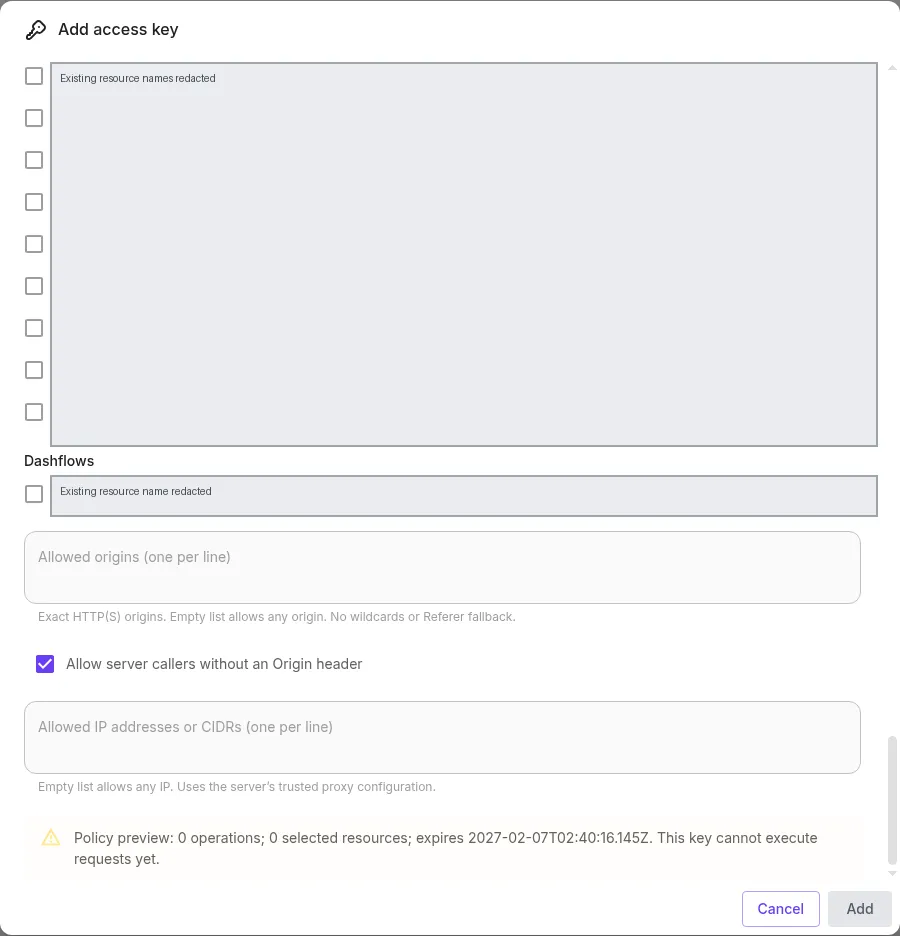
The figures below were captured on product 1.6.1 at feature head 5c08b125, before the 1.7.0 version bump. Enforcement remained Off, no key was created, and the create dialog was cancelled. Existing identities and resource names are redacted. The figures show the available screens and an unsubmitted policy preview.

1. Prepare enforcement with the instance operator
Section titled “1. Prepare enforcement with the instance operator”- Back up the database, installation encryption key and settings directory. Keep the encryption key: replacing it invalidates modern credentials. Rehearse migration on a restored backup using the migration report and diagnostics. Resolve every
requiresReviewresult before activation. - Check private custom-assistant integrations before proceeding. Exact custom ASSISTANT grants are unsupported; existing private integrations can work in Off or Shadow but return
401in On. Keep those installations Off or Shadow until an alternative is ready. - Verify a fresh sign-in (within ten minutes) using Instance operator in Server settings, then as the designated operator open Admin > Server settings > Security & network > Access keys > Access-key enforcement. Confirm the effective mode and its source. A nonempty host
INBOUND_ACCESS_V2overrides and locks the selector, including host-setoff. - Review a change to Shadow and type APPLY. Shadow serves legacy decisions and records scoped flow comparisons without charging quotas. It is not a simulation of every route or quota. Check the audit comparisons and separately exercise the routes your app uses in the restored installation.
- When ready for that installation, review a change to On and type APPLY. This affects every workspace on the service. A saved mode applies on the next request and persists across restarts. New scoped keys cannot be issued in Off or Shadow.
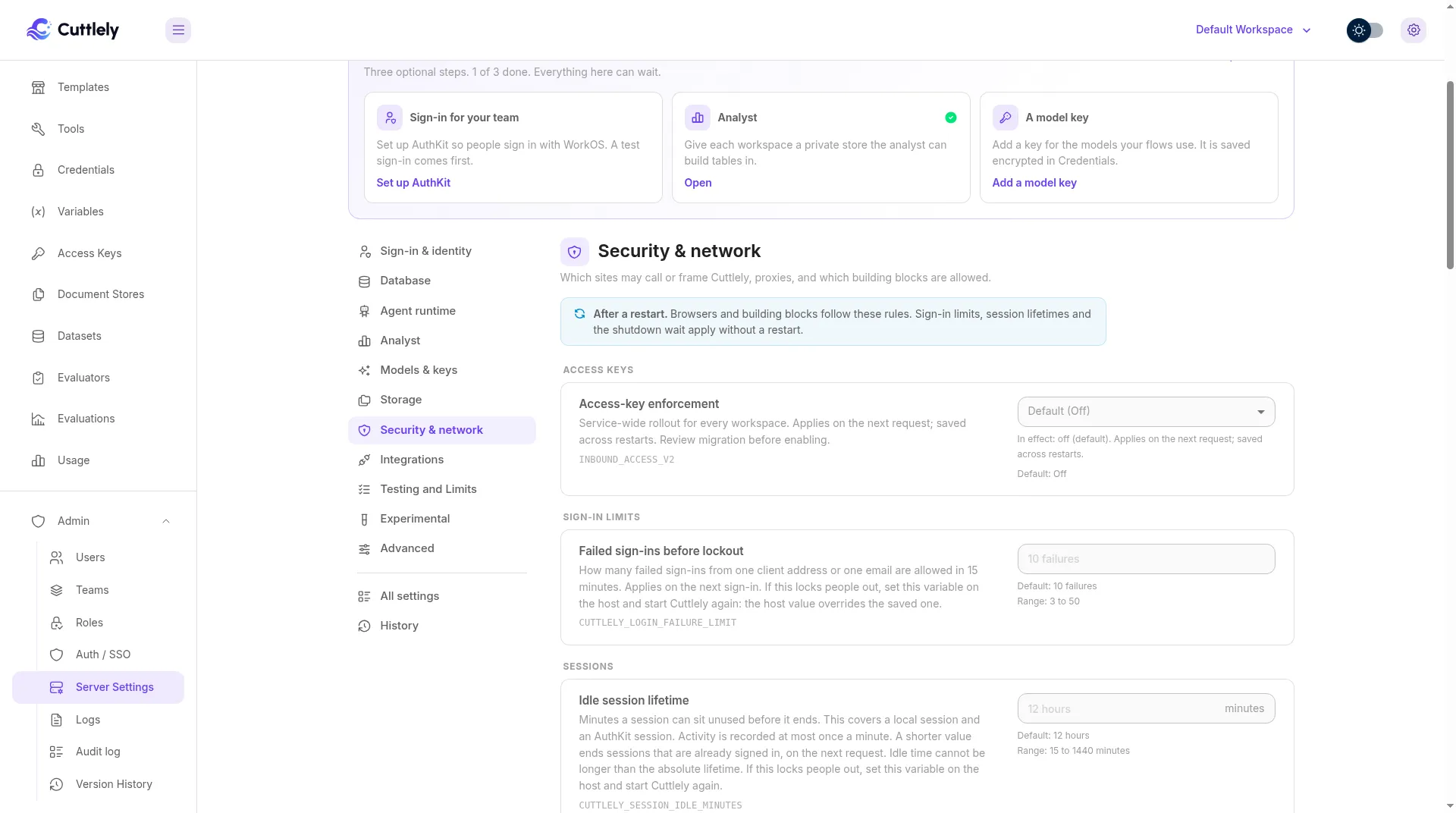
Enforcement supports one API instance (CUTTLELY_API_KEY_INSTANCES=1). Minute counters are process-local and reset on restart; do not promise exact cross-replica limits. MySQL/MariaDB schema changes may commit partially on failure; the release has not validated those migrations against a live server. Read the reference before planning that upgrade.
2. Create the key
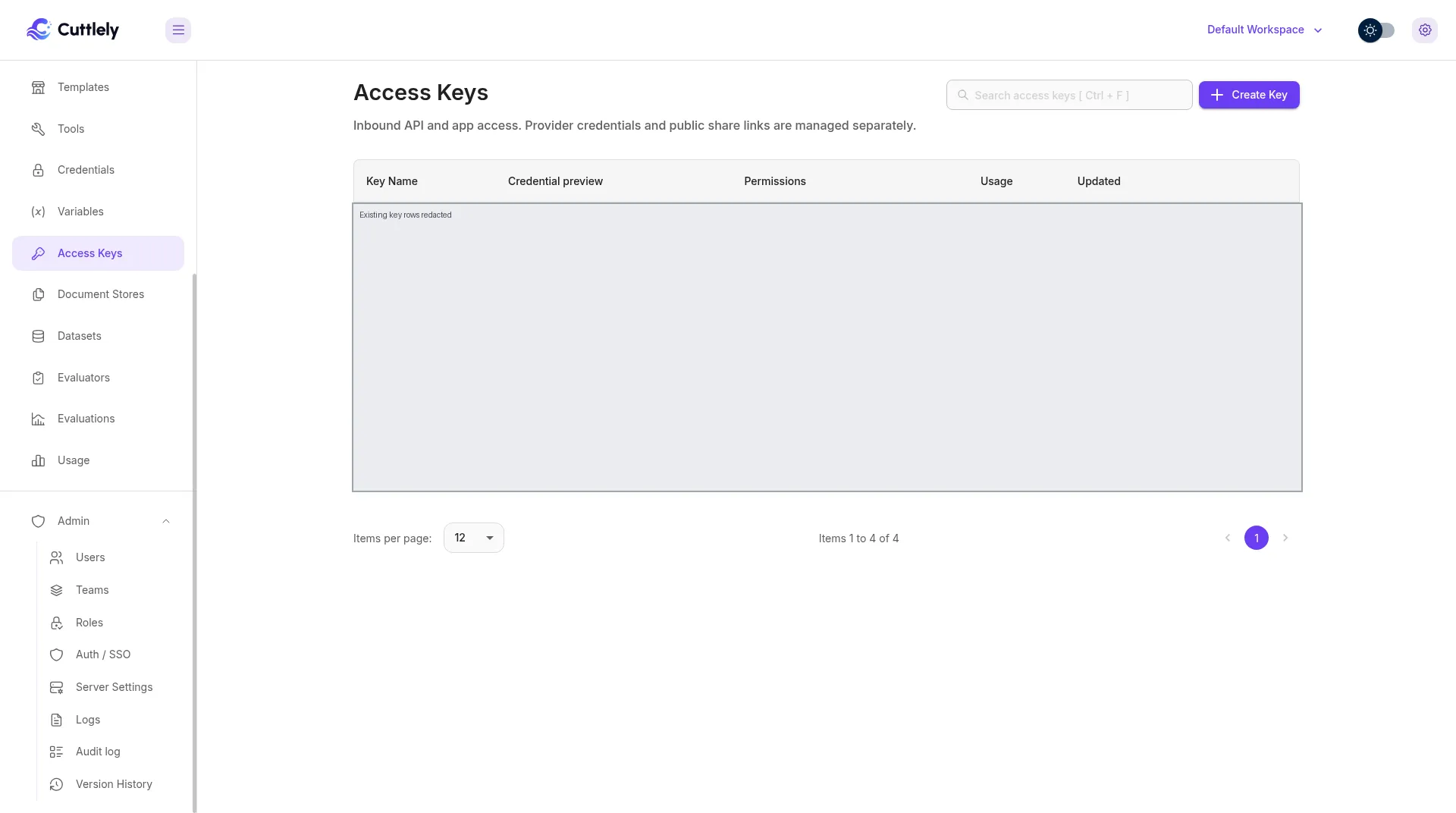
Section titled “2. Create the key”- In the intended workspace, open Access Keys and click Create Key. SDK/Settings and per-flow keys share this list; first check that you are in the right workspace.
- Start with Call one chatflow/agentflow, then pick the chatflows, agentflows or Harnesses your app will call. The form includes
predict, each flow’s required view permission, and referenced Harness grants withharness:run. The generated name can be changed. Read-only API instead grants reads of the selected resources, without prediction or edits. - Open the collapsed Advanced: permissions, API operations and resources only when you need more control. Add
streamfor JSON streaming. Multipart prediction also needsuploadandstream; feedback usesfeedback:readorfeedback:write. See the route matrix. - Leave All resources in this workspace, including future resources off for one integration. This option requires
apikeys:grant-alland separate confirmation; it includes future resources but does not remove operation, permission, caller or quota checks. - Advanced also contains Service or application, the descriptive Live/Test Environment label, expiry and limits. The default expiry is 90 days, the minute limit is 60, and day/month quotas are unlimited (
0). These labels do not isolate data. - Click Add. The server checks the complete selection. If anything is missing, read the explanation and use Add missing access, then save again. An unavailable or unpublished Harness needs an admin’s help; the form keeps your choices while you fix it.
- Copy the secret into your server’s secret manager. It is shown once with a copy button and cURL/JavaScript examples for the chosen flow. Set
CUTTLELY_API_KEYon your server before running the examples; they do not embed the secret. Click Done. A lost secret requires rotation.
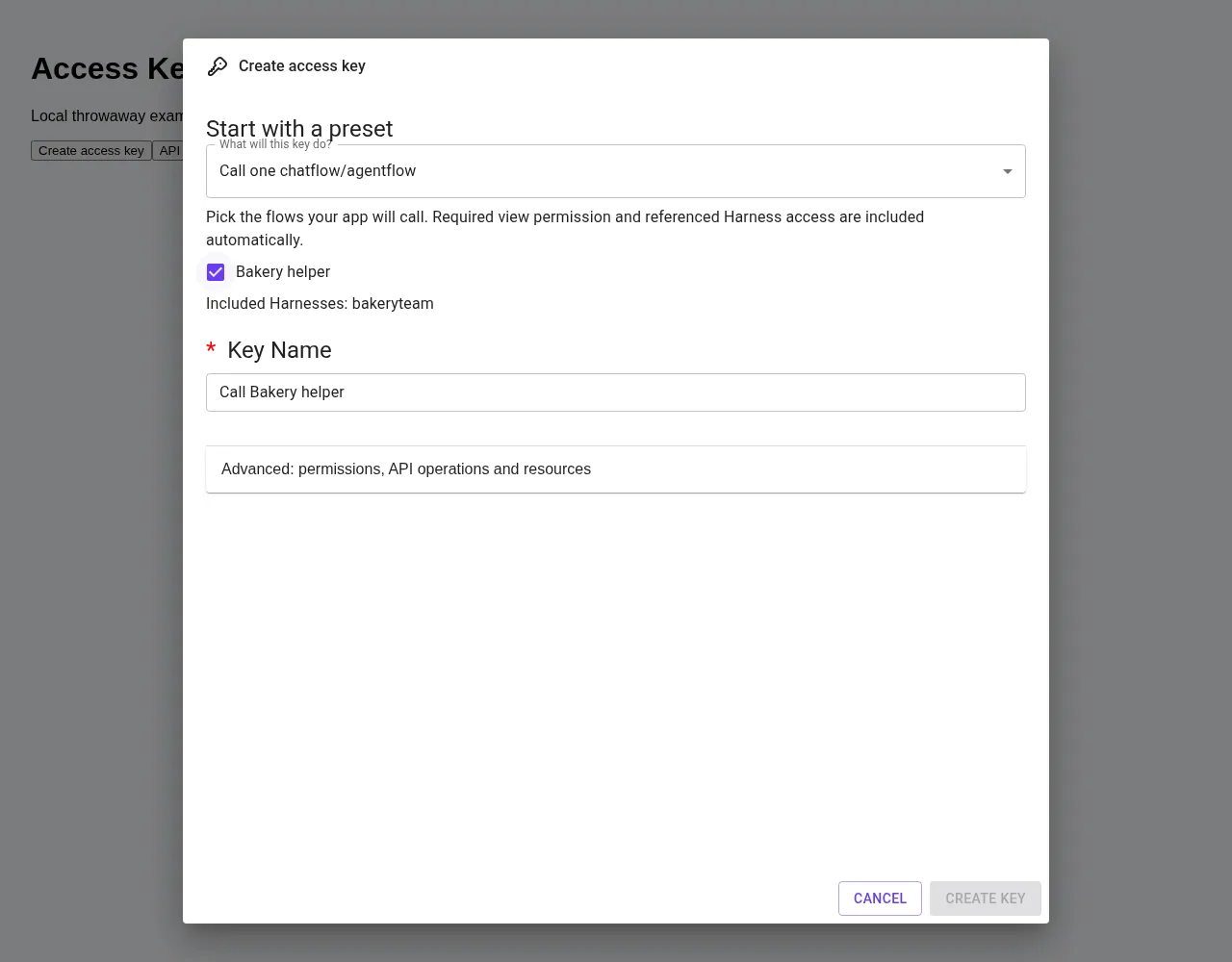
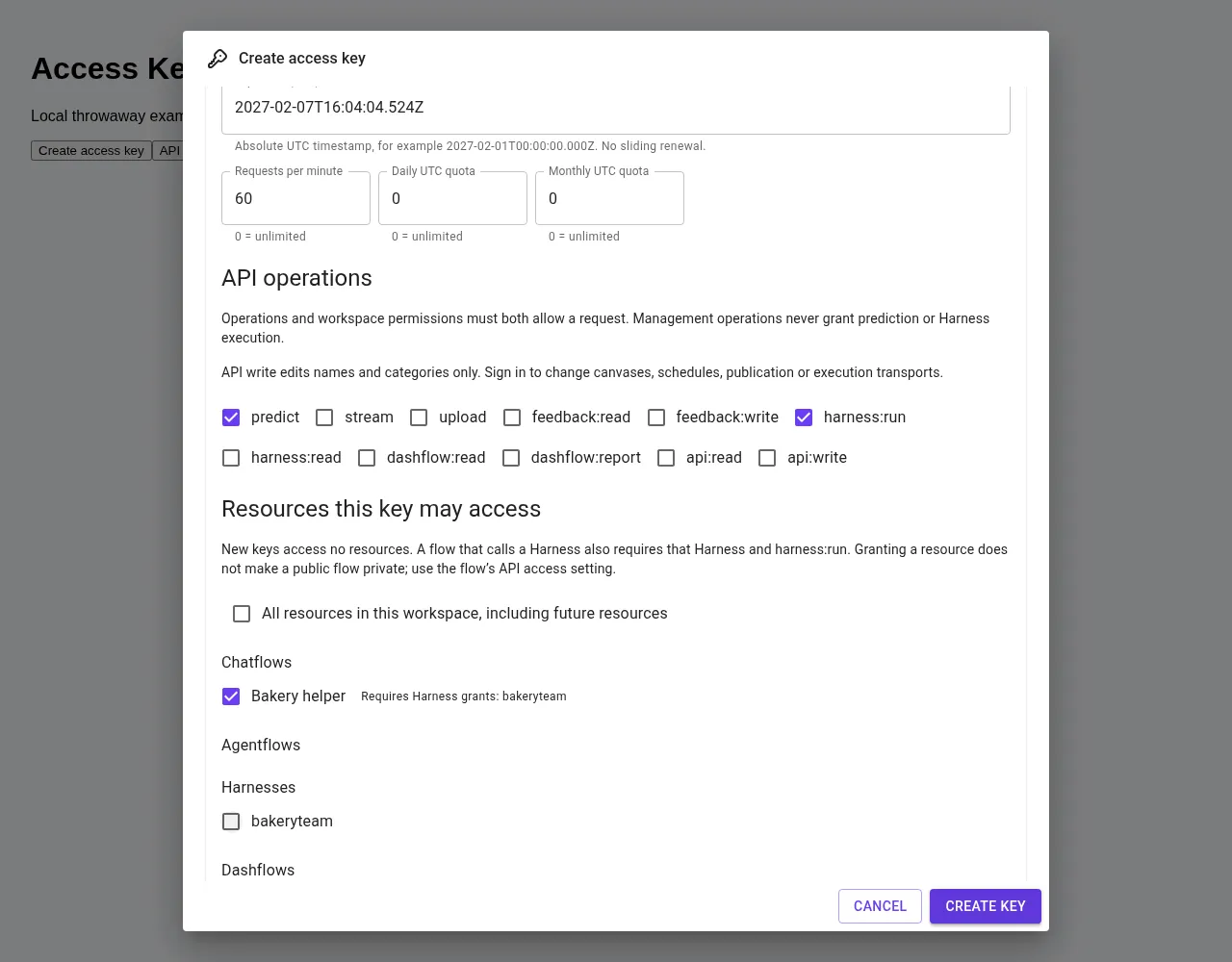
The preset and validation figures use the actual UI with a local throwaway SQLite route fixture, made-up flow names and no model calls. Any IDs and secrets are redacted. They illustrate the 1.7.1 flow; earlier operator figures retain their original capture provenance.
Presets grant only the resources you pick and the prerequisites shown by the server. The create button requires a resource and an API operation. Direct API creation without explicit scopes/grants still grants nothing; it is not a usable runtime key until configured. Exact grants follow stable IDs: a deleted resource recreated with the same name does not inherit the deleted resource’s grant.
3. Make the flow private
Section titled “3. Make the flow private”Open the flow’s API Endpoint dialog and select Private: only keys you pick when the flow must require a bearer. The access selector shows the state loaded from the server, and a successful save shows API access saved. Create key for this flow opens the call preset with the saved Chatflow, Agentflow or Harness selected, including when the workspace contains only Harnesses. For a Harness, validation includes predict, harness:run and the applicable view permission; creation stays disabled until the selection passes validation. Workspace-wide prediction keys can also call private flows; the dialog warns when they are present. A resource grant alone does not make a public flow private. Keep public embeds separate; do not paste this key into embed configuration. See Share and embed.
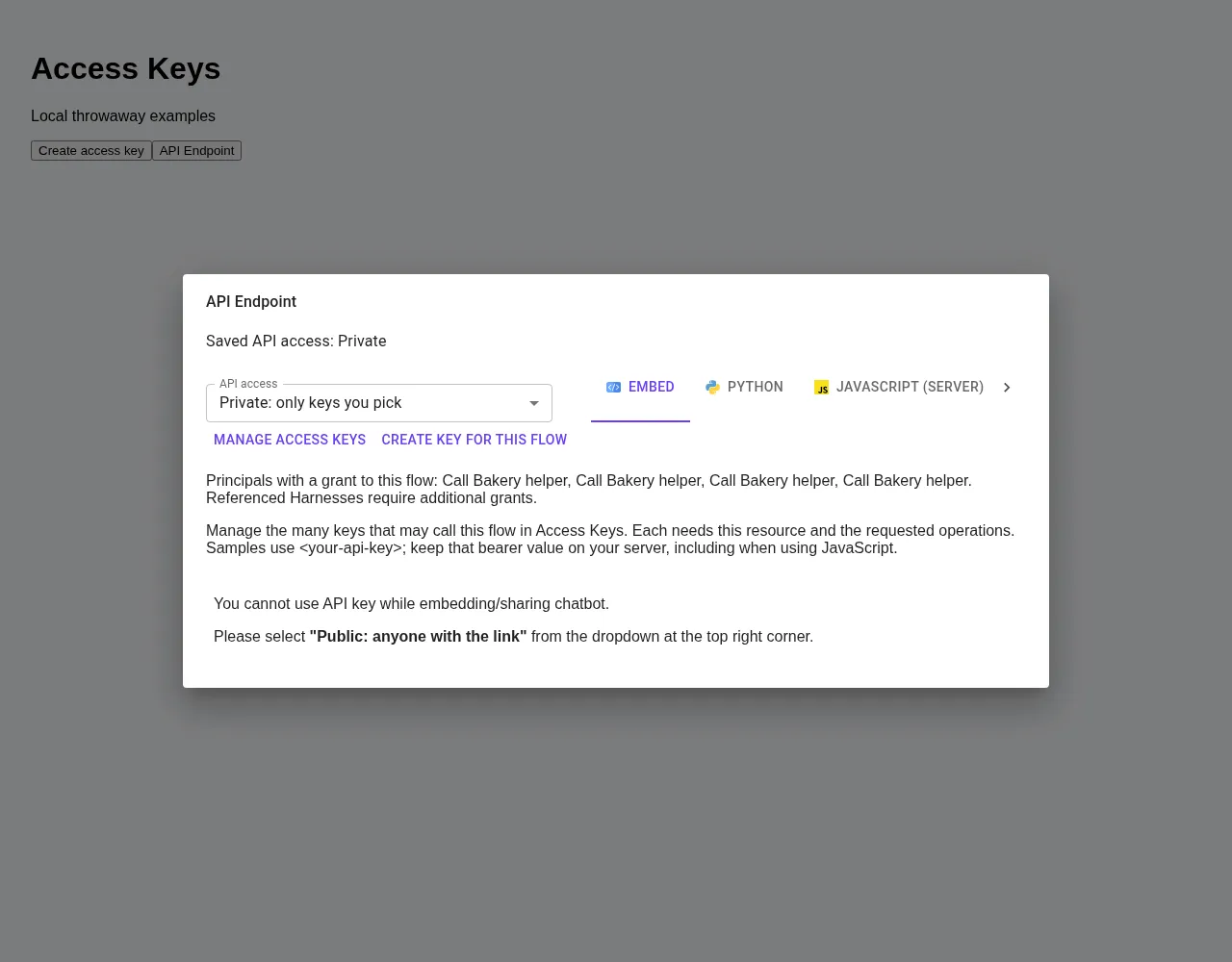
This 1.7.1 figure uses the same local throwaway route fixture; no deployment or enforcement activation is shown.
4. Restrict callers, if needed
Section titled “4. Restrict callers, if needed”Edit the key to add Allowed origins (one per line). Each entry must be an exact HTTP(S) origin, such as https://app.example.com, with no path or wildcard. An origin allowlist rejects callers with no Origin unless you check Allow server callers without an Origin header. Server-to-server calls commonly omit that header. An empty list has no origin restriction. Origin and CORS are not a replacement for authentication.
Allowed IP addresses or CIDRs (one per line) accepts IPv4, IPv6 and CIDRs. An empty list has no IP restriction. Ask the operator to check the trusted-proxy boundary before relying on this: the server uses its resolved client IP, not arbitrary forwarded headers.
Click Save after editing. When editing a migrated legacy policy, saving replaces migration compatibility with the explicit policy shown. Check scopes and resources before saving; the old secret value does not change.
5. Call the flow from your server
Section titled “5. Call the flow from your server”Have your secret manager supply CUTTLELY_API_KEY to the calling process. Set CUTTLELY_BASE_URL to your server URL and FLOW_ID to the selected flow’s ID. Never use a browser environment variable that gets bundled into client code. This example makes a real prediction; use your approved test installation and test flow first.
: "${CUTTLELY_API_KEY:?Supply the key through your secret manager}": "${CUTTLELY_BASE_URL:?Set the Cuttlely server URL}": "${FLOW_ID:?Set the granted flow ID}"curl --silent --show-error --include \ "${CUTTLELY_BASE_URL}/api/v1/prediction/${FLOW_ID}" \ --header "Authorization: Bearer ${CUTTLELY_API_KEY}" \ --header 'Content-Type: application/json' \ --data '{"question":"What can this team help with?","streaming":false}'A successful nonstreaming prediction returns its JSON response. Do not use verbose HTTP tracing in shared logs: it can expose the Authorization header. Test the actual route your app uses; a credential-check endpoint does not prove that scopes, resources or quotas permit a prediction.
One accepted HTTP operation counts once, not once per token, streamed chunk or nested Harness task. Authorization refusals do not consume the key’s quota. Application failures after complete authorization remain charged. Daily/monthly windows use UTC; rotation shares the same principal’s policy and counters and does not reset its budget. Separate flow/IP prediction-attempt limits can still apply, including to refused attempts.
6. Rotate without dropping callers
Section titled “6. Rotate without dropping callers”- Open the key and find Credentials and usage.
- Set Rotation grace (seconds, 0–86400). The default is 3600 seconds. Use
0only when immediate retirement is intended. - Click Rotate and reveal successor once. Store the successor in the calling service’s secret manager. Do not screenshot or log it.
- Roll out that secret to every caller within the grace period. Confirm your approved test calls work with the successor before retiring the previous credential.
- Revoke the previous credential with Revoke credential, or Revoke legacy credential for a retained legacy bearer. Repeated rotations do not extend an earlier cutoff.
Extending the principal’s expiry does not extend an already issued credential. Rotate to issue a credential with the new expiry. An expired or revoked credential does not revive through a policy edit.
7. Revoke access
Section titled “7. Revoke access”Use the list’s Revoke action to revoke the principal and block new requests from every credential belonging to it. Use credential revocation to retire one secret. Already admitted streams or background runs may finish. Inspect usage and Admin > Audit log for lifecycle and policy changes; usage events are aggregated/deduplicated, not a complete per-request ledger.
Troubleshoot and recover
Section titled “Troubleshoot and recover”| What you see | What to check |
|---|---|
| Creation or rotation unavailable | Check effective enforcement mode. New scoped principals require On; do not change a service-wide mode without an operator rollout plan. |
401 |
Missing, expired, revoked or invalid credential; wrong endpoint or workspace; private custom ASSISTANT integration under On. A supplied invalid bearer does not fall through to public access. |
403 |
Current permissions, scope, exact resource and caller policy. A Harness-backed flow also needs the Harness grant and harness:run. |
404 |
Check IDs and route ownership; some routes conceal resources the caller cannot access. |
429 |
Honor Retry-After; check the principal’s minute/UTC quota and separate flow/IP limits. Rotating is not a quota reset. |
503 |
Ask the operator to inspect invalid host mode, authentication/quota storage availability or unsupported instance count. Do not retry without a bound. |
| A new same-name resource fails | Grant the new stable ID explicitly. Do not expect deletion/recreation to restore authority. |
| Only the instance operator can change settings | Open Instance operator. Eligible active owners use the one-time panel claim, recovery or rebind with host-log proof. A defined host override locks panel management. A binding created by the 1.7.0 host CLI supplies the automatic default; CLI binding is an emergency recovery path, not a mandatory existing-install step. |
To roll back enforcement, the designated operator reviews Off in the selector. If browser administration is unavailable, the host can set INBOUND_ACCESS_V2=off in the application’s actual process environment and restart/recreate the service. With Compose, confirm the variable is forwarded into the service; setting an arbitrary host .env entry alone is not sufficient. This restores legacy decisions and refuses new scoped principals; it does not turn modern credentials into legacy secrets. Do not drop migration tables as a rollback.
Use the panel for routine operator transfer/revoke and fresh host-log proof for a changed-connection rebind. Disabled or invalid authority uses the separate RECOVER flow, never ordinary CLAIM. If nobody can sign in or files are unsafe, use the host CLI as the application OS user. Host JSON overrides the managed state; none, empty and invalid overrides close panel claims and mutations. See operator recovery.
For complete route details and current limits, use the access-key reference. For server sign-in and settings recovery, use Server settings and Startup options.
Prediction permissions and private copies
Section titled “Prediction permissions and private copies”A prediction key needs predict, the exact flow grant, and chatflows:view for a chatflow or agentflows:view for an agentflow. Selecting prediction in the editor includes its required view permission, and the server checks the combination when you save. A referenced Harness also needs its own grant, harness:run and view permission; running a granted team does not require permission to edit it. The Harness permission group explains this prerequisite. Named Harness run routes retain their legacy/session role checks; scoped runs use view permission with their explicit grants.
Calls between flows and Harnesses
Section titled “Calls between flows and Harnesses”On the same server, Execute Flow, Chatflow Tool, Agent as Tool, and Harness tools run the target in process as the parent run’s caller. This includes a chatflow or agentflow calling a Harness, and a Harness specialist calling a chatflow or agentflow. A signed-in caller can reach a Private target in the same workspace without an API key.
An access key keeps the parent principal throughout the nested run. A Harness target needs predict, harness:run, its exact Harness grant, and chatflows:view. A chatflow target needs predict, its exact Chatflow grant, and chatflows:view. An agentflow target needs predict, its exact Agentflow grant, and agentflows:view. The key owner’s current permissions must also allow the target, including for migrated legacy keys. A key granted only to the parent cannot use the parent to reach another Private flow or Harness.
With CUTTLELY_HARNESS_QUEUE=external, the separate Harness worker performs the same checks using its connection to the application database. Before calling another flow on the same server, it rechecks that the key is active, has the target grants and scopes, and still has an owner with the required permissions. It also runs an authorized same-server Harness canvas target on its own runtime, without the web process. Pinned tools in that target keep the worker’s database connection, the same caller and the incremented nesting depth for later nested calls. Model-chosen tool calls in a Harness that is itself running as a nested call on the external worker cannot call another same-server flow and are refused with caller_required; use inline queue mode when a Harness called from another Harness must call further private flows. A missing or revoked key is refused, and a missing grant returns 403. The worker does not use a saved card credential if these checks fail.
Calls between flows have an eight-level nesting limit. An agentflow iteration keeps the parent run’s nesting depth, so a cycle through an iteration reaches the same limit. If a run reaches it, check the Execute Flow and tool targets for a cycle before trying again.
The target must be in the parent’s workspace. Anonymous callers still reach only Public flows with no bound key, and an anonymous request to a Private prediction endpoint still returns 401. These rules do not turn a Private target into a public one. When a card sets a different Base URL, it keeps the remote HTTP path and uses only the credential configured on that card; the parent bearer is not forwarded. Each Harness chat keeps its own caller, so concurrent chats on the same team use their own access-key grants or signed-in authority. This also applies when the same caller reaches the team at different nesting depths. Nested tool calls need the active chat’s runtime scope; missing or invalid scope refuses the call without using a card credential. Reusing a chat ID that is still running refuses only the new run. Other chat IDs continue independently.
Duplicating a flow starts the copy Private. Access-key grants are not copied, and the canvas says so explicitly. Open API Endpoint for the copy and select or create access for its new ID before calling it. The source flow keeps its access. The dialog reloads current saved access from the server, displays Saved API access: Private and confirms successful saves. A failed save keeps the previous saved state.
On PostgreSQL and SQLite, deleting a flow removes its private binding and its workspace’s exact grants in the same transaction. It leaves the keys themselves and their other grants available. A cleanup failure leaves the original flow and grants in place.