

Roles and permissions
A role is a named list of permission keys. A workspace is a team: chatflows, harnesses, pipelines, credentials, and the other records belong to one team, and the person works in the team that is active. A harness and its runs belong to that one team. The harness routes answer 404 for a harness in another team, the same as a missing harness. Saving a name that another team already uses, or a saved harness that is not in a team yet, answers 409 and does not save that canvas. A chat, webhook, schedule, or embed does not run a harness from another team, or a harness that is not in a team yet. The first account is the organization owner. Everyone else gets a role on a team, and that role is what they can open.
Sign in first. Sign in creates the owner account.
The menu label is Teams. The page is /workspaces.
The first account creates a team named Default Workspace. Records you add stay in the active team. Switch teams from the team control when you belong to more than one.
Personal Workspace is a reserved name. The Teams page hides it, and Add User will not place someone there.
To add a team, open Admin, then Teams, and select Add Team. The name cannot be Default Workspace or Personal Workspace. Adding a team uses workspace:create. Editing it uses workspace:update. Deleting it uses workspace:delete. The members page is /workspace-users/:id.
Built-in roles
Section titled “Built-in roles”Three roles are stored with no organization, so every install has them. The Roles page lists two of them.
| Role | What you see | What it grants |
|---|---|---|
| owner | Super User, read-only | The organization owner. The Roles page marks it Built-in. Read-only. The row created with the first account stores an empty permission list. The account still passes every check, including pages marked server:owner, because the role name is owner. The Roles page does not edit this row. When local password sign-in is on, an organization owner can assign it with PUT /api/v1/users/:id/role. |
| member | member | The description is “Has limited control over the organization.” The permission list is empty. You can assign it. A person with only this role has no key, so the gated pages stay closed. |
| personal workspace | Hidden | The long permission list stored for that role, including keys the role dialog leaves out. The Roles page does not list it, and you cannot assign it. |
The owner’s own role row, the one tied to the organization, stores an empty permission list. The role name owner is what makes the account the organization owner. A second owner row, with no organization, stores the tokens organization and workspace. Those tokens are not keys in the table below. The Roles page shows the organization’s Super User. The API returns the fixed catalog set for Owner, Admin, Builder, and Viewer. Saving a change to any of those names is refused.
When local password sign-in is on (CUTTLELY_LOCAL_USERS=true and AuthKit is unset), three more roles are seeded. They are fixed. A custom role stays editable.
| Role | What it grants |
|---|---|
| Owner | Every catalog key, and the owner bypass. Only an owner can assign it. The last enabled organization owner cannot be demoted, disabled, deleted, or removed, even with no team. |
| Admin | Every catalog key, including people, roles, teams, server logs, and the audit log. An admin cannot assign Owner and cannot grant a key they do not hold. |
| Builder | Create, update, delete, and view keys for flows, tools, and data. No people, roles, teams, server logs, or the audit log. |
| Viewer | View keys only, except server logs and the audit log. |
The sets are the keys in permissionsCatalog.ts. The ids are stable. Local users, roles, and sessions lists the routes, who may call them, and the error codes. A team is still a workspace: list, create, edit, and membership stay on /api/v1/workspace and /api/v1/workspaceuser.
Create a role
Section titled “Create a role”Open Admin, then Roles, or go to /roles. You need roles:manage. The organization owner has it.
- Select Add Role.
- Enter a name and a description. The name cannot contain spaces, and it cannot be
owner,member, orpersonal workspace. - Check the permissions. The chatflows group also covers harnesses and ETL pipelines. Checking any action in a group also checks that group’s View key. Checking a template action other than Marketplace or Custom also checks those two.
- Select Create Role.
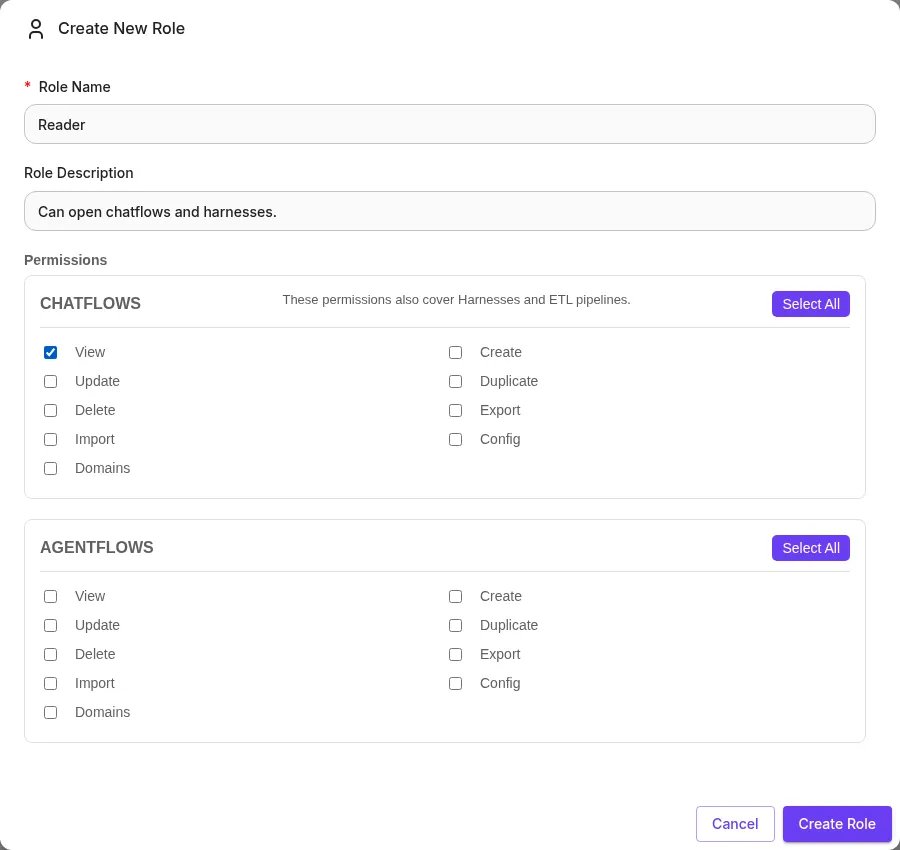
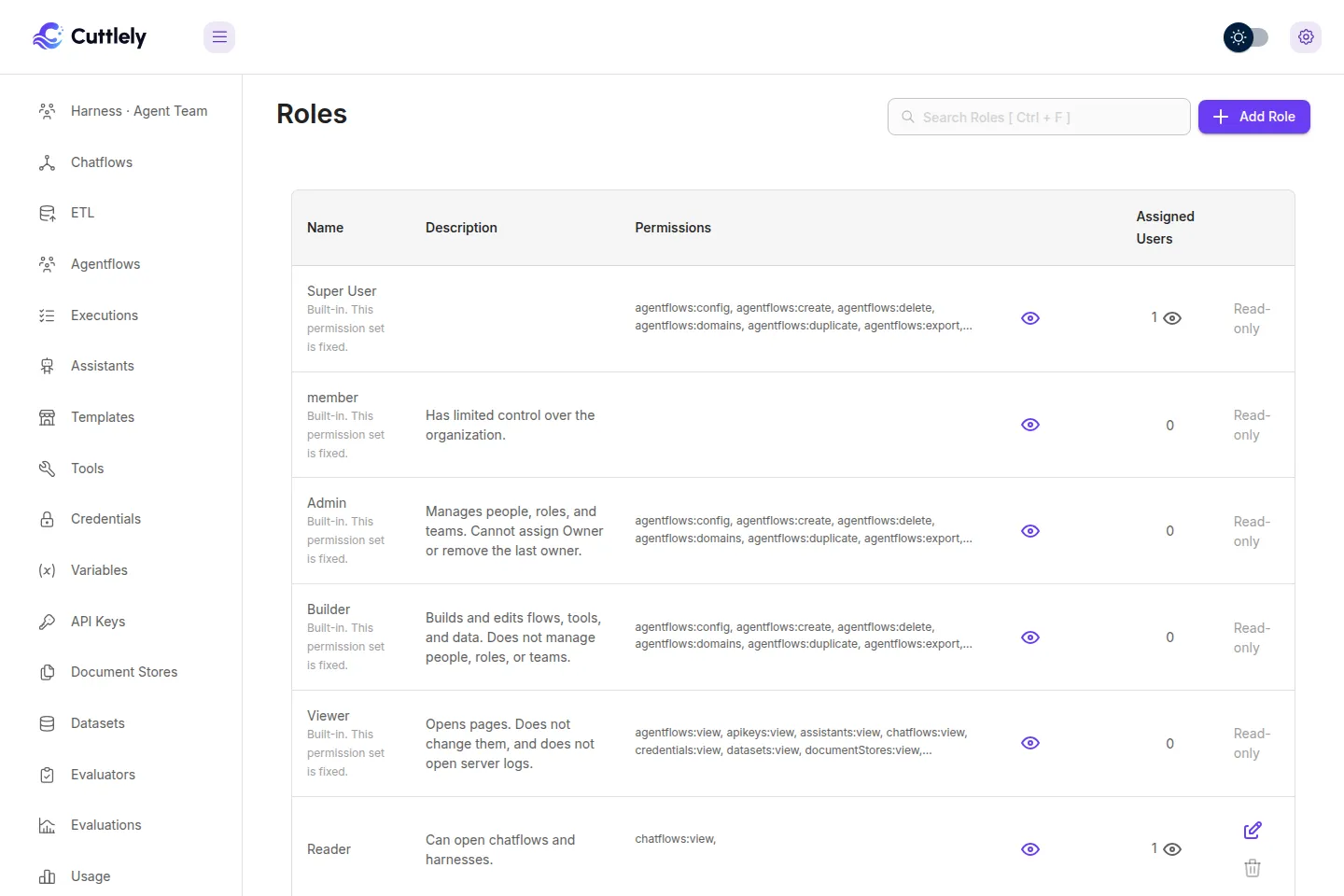
The dialog loads its checkboxes from GET /api/v1/auth/permissions/ROLE. A key the dialog leaves out cannot be saved on a new role. The eye icon on a row opens that role’s permissions. The other eye opens the people assigned to it. Edit and the trash icon change or delete a role you created. Super User stays read-only. A role that still has people assigned cannot be deleted.
Assign a user
Section titled “Assign a user”Open Admin, then Users, or go to /users. You need users:manage.
- Select Add User.
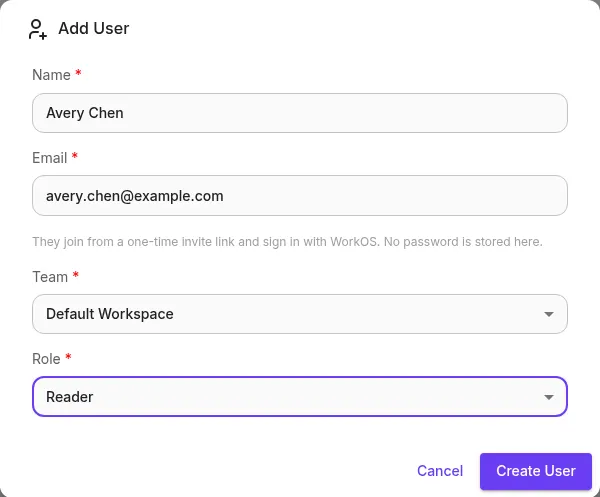
- Enter a name and an email, then choose a team and a role. To add someone who already has an account, pick them under Existing user, or enter their email (the name can stay blank). Super User appears in the role list for an organization owner. Personal Workspace is not in the team list.
- Select Create User, or Add to Team for an existing user.
An existing user is added to that team with the chosen role. No second account is created and their other teams are kept. Someone already on the team gets This user is already a member of this team, and nothing changes.
For a new user, Cuttlely stores the person as a pending invite (invited) and does not set a password. An existing active account gets access to the team right away and keeps its sign-in. With WorkOS on, the dialog then shows a one-time invite link once, and Cuttlely also emails it when mail is set. The person joins only by opening that link and signing in with that email: a WorkOS sign-in with a matching email alone shows You have a pending invite. Open the invite link from your email to join. The link is single use, expires, and stops working when a newer one replaces it or the person is disabled or removed. They have no access to any team until they accept. See Invite people.
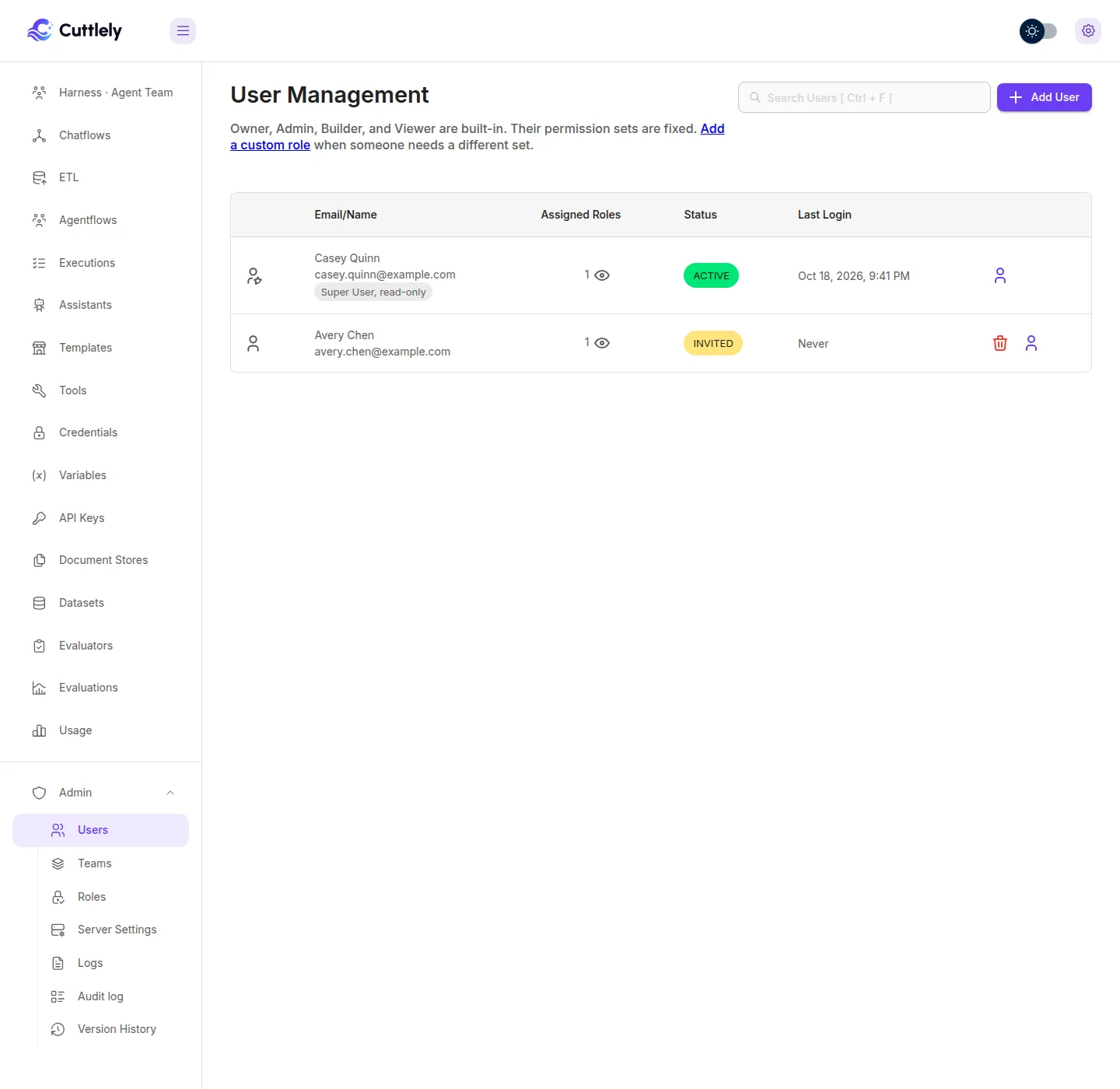
The eye on a row lists each team and the role on that team. The trash icon removes the person. You cannot delete the organization owner or your own row. The assigned-role count and the last login include every team in the organization for an organization owner, except Personal Workspace. Anyone else sees only the teams they belong to.
Change role (the person icon with a gear) on a row lists that person’s teams. Select Change next to a team, for example Default Workspace on Avery Chen’s row, pick a role, and select Update Role. It uses workspace:update, and someone who is not the organization owner sees and changes only their active team. It does not appear on the organization owner’s row or your own, and the server refuses a change to your own role, a change to an organization owner’s role by anyone who is not an organization owner, assigning Super User by anyone who is not an organization owner, and a role with a permission you do not hold. Someone who is not the organization owner also cannot change or remove a person whose current role has a permission they do not hold, so a team lead cannot demote an admin.
To change the role on a team, use Change role in Users, or open Teams, open the team, and pick another role. Both use workspace:update and the same rules. workspace:add-user creates a new user on a team, or adds someone who already has an account in the organization to a team. Someone who is not the organization owner can do either only on their active team. Removing someone from a team uses workspace:unlink-user.
How a check works
Section titled “How a check works”The owner of the active team’s organization passes every check. An owner role in another organization does not. For everyone else, the active team’s role supplies the keys.
A page opens when the role holds any key in that page’s list. A button on the page uses the same rule. An API route written with one key requires that key. A route written with several keys allows the call when the role holds any one of them.
An API key can carry prediction keys, including dataset, evaluator, and evaluation keys. The API key dialog does not offer workspace, users, roles, logs, or audit keys. Creating or updating a key with a workspace: permission, logs:view, or audit:view returns 400. An API key has no user id, so GET /api/v1/logs and GET /api/v1/audit refuse it, and it never passes an owner check. A harness run, or a read of a harness’s runs, also needs the harness on the key’s own harness list. The list is empty on a new key, so a key runs no harness until one is ticked under Harnesses this key may run. See Run a harness in the background.
After sign-in, someone who is not the organization owner opens the first page in this order: Chatflows (chatflows:view), Agentflows (agentflows:view), Executions (executions:view), Assistants (assistants:view), Templates (templates:marketplace or templates:custom), Tools (tools:view), Credentials (credentials:view), Variables (variables:view), API Keys (apikeys:view), Document Stores (documentStores:view), Datasets (datasets:view), Evaluators (evaluators:view), Evaluations (evaluations:view), Users (users:manage), Teams (workspace:view), then Roles (roles:manage). Chatflows is first. Harnesses and ETL are not separate landing targets. Users, Teams, and Roles stay available on this install when the login snapshot has no feature flags. Logs is not a landing target. Usage is not a landing target. A role whose only matching key is datasets:view, evaluators:view, or evaluations:view opens that page, because the pages before it need other keys.
The table lists every permission key defined in the server and the UI. scripts/permission-keys.mjs is that list. scripts/permission-keys.test.mjs fails when this table and that list differ, including a key added or removed on only one side, and when a route named here does not check that key.
Permission keys
Section titled “Permission keys”The role dialog offers dataset, evaluator, evaluation, and logs:view keys. It leaves out credentials:share, templates:custom-share, workspace:export, workspace:import, sso:manage, executions:update, and server:owner.
| Key | Allows | Pages | API routes |
|---|---|---|---|
agentflows:config |
Open Configuration on an agentflow, including its MCP server settings, and load text-to-speech voices. | Agentflow menu | GET, POST, PUT, DELETE /api/v1/mcp-server/:id, POST /api/v1/mcp-server/:id/refresh, GET /api/v1/text-to-speech/voices |
agentflows:create |
Create an agentflow. Also one of the keys that can save a harness, register a webhook listener, run a custom function, or abort a chat message. | Add on /agentflows, and the build menu. The first save of a new agentflow checks agentflows:create. Edit Name checks agentflows:create,agentflows:update. Use Template on an agentflow template needs templates:marketplace or templates:custom to open the template, and agentflows:create for the button |
POST /api/v1/chatflows, POST /api/v1/harnesses, POST /api/v1/harnesses/:name/runs, POST /api/v1/harnesses/:name/runs/async, PUT and DELETE /api/v1/harnesses/:name/schedule, POST /api/v1/harnesses/:name/schedule/pause and /resume, POST /api/v1/webhook-listener/:id/register, GET /api/v1/webhook-listener/:id/stream/:listenerId, DELETE /api/v1/webhook-listener/:id/listener/:listenerId, POST /api/v1/node-custom-function, PUT /api/v1/chatmessage/abort, POST /api/v1/node-load-method |
agentflows:delete |
Delete an agentflow, a harness, or the chat messages on one. | Delete on the agentflow menu | DELETE /api/v1/chatflows/:id, GET /api/v1/chatflows/:id, DELETE /api/v1/harnesses/:name, DELETE /api/v1/chatmessage, POST /api/v1/node-load-method |
agentflows:domains |
Open the allowed-domains action on an agentflow. | Agentflow menu | No API route checks this key. |
agentflows:duplicate |
Duplicate an agentflow from its menu. | Agentflow menu | No API route checks this key. |
agentflows:export |
Export an agentflow from its menu. | Agentflow menu | No API route checks this key. |
agentflows:import |
Import an agentflow from its menu. | Agentflow menu | No API route checks this key. |
agentflows:update |
Save, publish, roll back, and restore an agentflow, and edit its webhook secret and schedule. A draft of an assistant flow checks assistants:update after this gate. |
Publish, draft Save, Review, and Discard draft on the agentflow canvas check agentflows:update. Edit Name checks agentflows:create,agentflows:update |
PUT /api/v1/chatflows/:id, GET /api/v1/chatflows, webhook secret and schedule routes on /api/v1/chatflows/:id, PUT /api/v1/flow-drafts/:chatflowId, DELETE /api/v1/flow-drafts/:chatflowId, POST /api/v1/flow-drafts/:chatflowId/publish, POST /api/v1/flow-drafts/:chatflowId/rollback, POST /api/v1/flow-drafts/:chatflowId/check, DELETE /api/v1/flow-drafts/:chatflowId/check/:checkId, PUT /api/v1/flow-drafts/:chatflowId/settings, POST /api/v1/flow-versions/:chatflowId/:sha/restore, POST /api/v1/webhook-listener/:id/register, GET /api/v1/webhook-listener/:id/stream/:listenerId, DELETE /api/v1/webhook-listener/:id/listener/:listenerId, POST /api/v1/node-custom-function, PUT /api/v1/chatmessage/abort, POST /api/v1/node-load-method |
agentflows:view |
Open agentflows, their canvases, drafts, messages, and version history. Older V1 agentflows use the same key. A draft of an assistant flow checks assistants:view after this gate. Either this key or chatflows:view opens Usage. Add to test set and Add rated answers to test set on an agentflow answer also check this key. Save as dataset is in Choose questions in the Publish dialog and also checks this key. A form, webhook, or schedule start is refused. |
/agentflows, /agentcanvas, /agentcanvas/:id, /v2/agentcanvas, /v2/agentcanvas/:id, /versions/:chatflowId/:sha, /usage |
GET /api/v1/chatflows, GET /api/v1/harnesses, GET /api/v1/harnesses/:name, GET /api/v1/harnesses/:name/runs, GET /api/v1/harnesses/:name/runs/:runId and /result, GET /api/v1/harnesses/:name/schedule, GET /api/v1/flow-drafts/:chatflowId, GET /api/v1/flow-drafts/:chatflowId/check/history, GET /api/v1/flow-versions/status, GET /api/v1/flow-versions/:chatflowId, GET /api/v1/chatmessage, GET /api/v1/internal-chatmessage, POST /api/v1/node-load-method, GET /api/v1/stats/usage, POST /api/v1/datasets/rows/from-message, POST /api/v1/datasets/rows/from-ratings, POST /api/v1/datasets/from-questions |
apikeys:create |
Create an API key, and update one. | Add on /apikey |
POST /api/v1/apikey, PUT /api/v1/apikey/:id, GET /api/v1/auth/permissions/API_KEY |
apikeys:delete |
Delete an API key. | Trash icon on /apikey |
DELETE /api/v1/apikey/:id |
apikeys:update |
Update an API key. | Edit on /apikey |
PUT /api/v1/apikey/:id |
apikeys:view |
Open the API key list. | /apikey |
GET /api/v1/apikey, GET /api/v1/auth/permissions/API_KEY |
assistants:create |
Create an assistant, an assistant vector store, or upload assistant files. | Add on /assistants, /assistants/custom, /assistants/openai |
POST /api/v1/assistants, PUT /api/v1/assistants/:id, POST /api/v1/openai-assistants-vector-store, PUT /api/v1/openai-assistants-vector-store/:id, POST /api/v1/openai-assistants-file/upload |
assistants:delete |
Delete an assistant, an assistant vector store, or the chat messages on an assistant flow. | Delete on the assistant pages | DELETE /api/v1/assistants/:id, DELETE /api/v1/openai-assistants-vector-store/:id, DELETE /api/v1/chatflows/:id, DELETE /api/v1/chatmessage |
assistants:update |
Edit an assistant or its vector store and files. Also the key a draft save checks when the flow type is an assistant. | Edit on the assistant pages | PUT /api/v1/assistants/:id, PUT /api/v1/openai-assistants-vector-store/:id, POST /api/v1/openai-assistants-file/upload, and the draft save path in the flow-drafts controller |
assistants:view |
Open assistants and read an assistant vector store. Also the key a draft read checks when the flow type is an assistant. Add to test set and Add rated answers to test set on an assistant answer also check this key. Save as dataset checks this key for an assistant, then refuses the save. | /assistants, /assistants/custom, /assistants/custom/:id, /assistants/openai |
GET /api/v1/assistants, GET /api/v1/assistants/:id, GET /api/v1/openai-assistants, GET /api/v1/openai-assistants-vector-store, and the draft read path in the flow-drafts controller, POST /api/v1/datasets/rows/from-message, POST /api/v1/datasets/rows/from-ratings, POST /api/v1/datasets/from-questions |
audit:view |
Open Admin > Audit log and read sign-in, lockout, invite, reset, role, and disable events. Settings changes are shown only to the organization owner. A role can hold this key. Creating or updating an API key with it returns 400. The organization owner can open the audit log without this grant. Passwords, tokens, secret values, and question text are not in the rows. | /audit |
GET /api/v1/audit |
chatflows:config |
Open Configuration on a chatflow, including its MCP server settings, and load text-to-speech voices. Harnesses and ETL pipelines use the chatflow keys. | Chatflow menu | GET, POST, PUT, DELETE /api/v1/mcp-server/:id, POST /api/v1/mcp-server/:id/refresh, GET /api/v1/text-to-speech/voices |
chatflows:create |
Create a chatflow, harness, or ETL pipeline, run Try the demo, start an ETL run, upload, or schedule, and start a harness run. An API key also needs the harness on its harness list. | Add on /chatflows, /harnesses, and /etl, Try the demo, and the build menu. The first save of a new chatflow, harness, or ETL pipeline checks chatflows:create. Edit Name on /canvas, /harnesscanvas, and /etlcanvas checks chatflows:create,chatflows:update. Use Template on a chatflow, harness, or ETL template needs templates:marketplace or templates:custom to open the template, and chatflows:create for the button |
POST /api/v1/chatflows, POST /api/v1/harnesses, POST /api/v1/harnesses/:name/runs, POST /api/v1/harnesses/:name/runs/async, PUT and DELETE /api/v1/harnesses/:name/schedule, POST /api/v1/harnesses/:name/schedule/pause and /resume, POST /api/v1/demo, GET /api/v1/demo, write routes under /api/v1/etl, POST /api/v1/webhook-listener/:id/register, POST /api/v1/node-custom-function, PUT /api/v1/chatmessage/abort, POST /api/v1/node-load-method, GET and POST /api/v1/openai-realtime |
chatflows:delete |
Delete a chatflow or a harness, and delete chat messages. | Delete on the chatflow menu | DELETE /api/v1/chatflows/:id, GET /api/v1/chatflows/:id, DELETE /api/v1/harnesses/:name, DELETE /api/v1/chatmessage, POST /api/v1/node-load-method, GET and POST /api/v1/openai-realtime |
chatflows:domains |
Open the allowed-domains action on a chatflow. | Chatflow menu | No API route checks this key. |
chatflows:duplicate |
Duplicate a chatflow from its menu. | Chatflow menu | No API route checks this key. |
chatflows:export |
Export a chatflow from its menu. | Chatflow menu | No API route checks this key. |
chatflows:import |
Import a chatflow from its menu. | Import on /chatflows |
No API route checks this key. |
chatflows:update |
Save, publish, roll back, and restore a chatflow, edit a harness, and change ETL runs and schedules. | Publish, draft Save, Review, and Discard draft on /canvas, /harnesscanvas, and /etlcanvas check chatflows:update. Edit Name checks chatflows:create,chatflows:update |
PUT /api/v1/chatflows/:id, GET /api/v1/chatflows, webhook secret and schedule routes on /api/v1/chatflows/:id, the flow-drafts write routes, POST /api/v1/flow-versions/:chatflowId/:sha/restore, harness save and run (including POST /api/v1/harnesses/:name/runs/async), harness schedule save, pause, resume, and delete, ETL write routes, webhook-listener routes, POST /api/v1/node-custom-function, PUT /api/v1/chatmessage/abort, GET /api/v1/chatmessage, PATCH /api/v1/upsert-history, POST /api/v1/node-load-method, GET and POST /api/v1/openai-realtime |
chatflows:view |
Open chatflows, harnesses, and ETL pipelines, including canvases, messages, drafts, runs, and version history. Either this key or agentflows:view opens Usage. Add to test set and Add rated answers to test set on a chatflow, harness, or pipeline answer also check this key. Save as dataset is in Choose questions in the Publish dialog and also checks this key. A harness is refused. |
/chatflows, /harnesses, /harnesses/:name, /etl, /canvas, /canvas/:id, /harnesscanvas, /harnesscanvas/:id, /etlcanvas, /etlcanvas/:id, /versions/:chatflowId/:sha, /usage |
GET /api/v1/chatflows, GET /api/v1/harnesses, GET /api/v1/harnesses/:name, GET /api/v1/harnesses/:name/runs, GET /api/v1/harnesses/:name/runs/:runId and /result, GET /api/v1/harnesses/:name/schedule, GET /api/v1/etl/pipelines, GET /api/v1/demo, GET /api/v1/flow-drafts/:chatflowId, GET /api/v1/flow-drafts/:chatflowId/check/history, GET /api/v1/flow-versions/status, GET /api/v1/flow-versions/:chatflowId, GET /api/v1/chatmessage, GET /api/v1/internal-chatmessage, GET /api/v1/upsert-history, POST /api/v1/node-load-method, GET and POST /api/v1/openai-realtime, GET /api/v1/stats/usage, POST /api/v1/datasets/rows/from-message, POST /api/v1/datasets/rows/from-ratings, POST /api/v1/datasets/from-questions |
credentials:create |
Create a credential, open one credential, update it, and refresh its OAuth token. | Add on /credentials |
POST /api/v1/credentials, GET /api/v1/credentials/:id, PUT /api/v1/credentials/:id, POST /api/v1/oauth2-credential/refresh/:credentialId |
credentials:delete |
Delete a credential. | Trash icon on /credentials |
DELETE /api/v1/credentials/:id |
credentials:share |
The share control on a credential. The role dialog leaves this key out. | Share on /credentials |
No API route checks this key. The API-key feature map names it under sharing. |
credentials:update |
Open one credential, update it, and refresh its OAuth token. | Edit on /credentials |
GET /api/v1/credentials/:id, PUT /api/v1/credentials/:id, POST /api/v1/oauth2-credential/refresh/:credentialId |
credentials:view |
Open the credential list. Reading one credential by id uses create or update. | /credentials |
GET /api/v1/credentials |
datasets:create |
Create a dataset or a row, including saving a chat answer, the rated answers for a flow, or the questions ticked in Choose questions in the Publish dialog. A harness is refused. | Add on /datasets and on /dataset_rows/:id. Add to test set and Add rated answers to test set are shown, and New dataset does not need datasets:view. Save as dataset, in Choose questions in the Publish dialog, is shown for this key. A harness is refused. |
POST /api/v1/datasets/set, PUT /api/v1/datasets/set/:id, POST /api/v1/datasets/rows, PUT /api/v1/datasets/rows/:id, POST /api/v1/datasets/reorder, POST /api/v1/datasets/rows/from-message, POST /api/v1/datasets/rows/from-ratings, POST /api/v1/datasets/from-questions |
datasets:delete |
Delete a dataset or a row. | Trash icon on /datasets and on /dataset_rows/:id |
DELETE /api/v1/datasets/set/:id, DELETE /api/v1/datasets/rows/:id, PATCH /api/v1/datasets/rows |
datasets:update |
Update a dataset or a row, including saving a chat answer, or the rated answers for a flow, into a dataset from the message viewer. | Edit on /datasets and on /dataset_rows/:id. Add to test set and Add rated answers to test set are shown only together with datasets:view |
PUT /api/v1/datasets/set/:id, PUT /api/v1/datasets/rows/:id, POST /api/v1/datasets/reorder, POST /api/v1/datasets/rows/from-message, POST /api/v1/datasets/rows/from-ratings |
datasets:view |
Open Datasets, and load the existing-dataset list in Add to test set and in Add rated answers to test set. Without this key that list is hidden in both. A role with only this view key lands here after sign-in. | /datasets, /dataset_rows/:id |
GET /api/v1/datasets, GET /api/v1/datasets/set/:id |
documentStores:add-loader |
List document loaders and add one. | Add loader on a document store | GET /api/v1/document-store/components/loaders, POST /api/v1/node-load-method |
documentStores:create |
Create a document store, and update one. | Add on /document-stores |
POST /api/v1/document-store/store, PUT /api/v1/document-store/store/:id, POST /api/v1/node-load-method |
documentStores:delete |
Delete a document store, and delete a chunk. | Trash icon on /document-stores |
DELETE /api/v1/document-store/store/:id, GET /api/v1/document-store/store/:id, DELETE /api/v1/document-store/chunks/:storeId/:loaderId/:chunkId |
documentStores:delete-loader |
Remove a loader from a document store. | Loader actions on a document store | DELETE /api/v1/document-store/loader/:id/:loaderId |
documentStores:preview-process |
Preview, save, and process chunks. | Chunk preview on a document store | POST /api/v1/document-store/loader/preview, POST /api/v1/document-store/loader/save, POST /api/v1/document-store/loader/process/:loaderId |
documentStores:update |
Update a document store and edit a chunk. | Edit on a document store. Edit Chunk and its Save button check documentStores:update |
PUT /api/v1/document-store/store/:id, GET /api/v1/document-store/store/:id, PUT /api/v1/document-store/chunks/:storeId/:loaderId/:chunkId, DELETE /api/v1/document-store/chunks/:storeId/:loaderId/:chunkId, POST /api/v1/node-load-method |
documentStores:upsert-config |
Upsert a document store, configure its vector store, and clear upsert history. | Upsert and vector store pages under /document-stores |
POST /api/v1/document-store/upsert/:id, vector-store routes under /api/v1/document-store/vectorstore, GET /api/v1/document-store/components/embeddings, GET /api/v1/document-store/components/vectorstore, GET /api/v1/document-store/components/recordmanager, PATCH /api/v1/upsert-history |
documentStores:view |
Open document stores, read chunks, and query the vector store. | /document-stores and the store, chunk, vector, and query pages under it |
GET /api/v1/document-store/store, GET /api/v1/document-store/store/:id, GET /api/v1/document-store/chunks/:storeId/:fileId/:pageNo, POST /api/v1/document-store/vectorstore/query, POST /api/v1/document-store/generate-tool-desc/:id, GET /api/v1/upsert-history, POST /api/v1/node-load-method |
evaluations:create |
Create an evaluation or run one again. | Add on /evaluations |
POST /api/v1/evaluations, POST /api/v1/evaluations/run-again/:id |
evaluations:delete |
Delete an evaluation. | Trash icon on /evaluations |
DELETE /api/v1/evaluations/:id, PATCH /api/v1/evaluations |
evaluations:run |
Run an evaluation again. | Run again on /evaluation_results/:id |
POST /api/v1/evaluations/run-again/:id |
evaluations:update |
The role dialog offers this key. No page or API route checks it. | No page checks this key. | No API route checks this key. |
evaluations:view |
Open Evaluations. A role with only this view key lands here after sign-in, when no earlier page matches. | /evaluations, /evaluation_results/:id |
GET /api/v1/evaluations, GET /api/v1/evaluations/:id, GET /api/v1/evaluations/versions/:id, GET /api/v1/evaluations/is-outdated/:id |
evaluators:create |
Create an evaluator, and update one. | Add on /evaluators |
POST /api/v1/evaluators/:id, PUT /api/v1/evaluators/:id |
evaluators:delete |
Delete an evaluator. | Trash icon on /evaluators |
DELETE /api/v1/evaluators/:id |
evaluators:update |
Update an evaluator. | Edit on /evaluators |
PUT /api/v1/evaluators/:id |
evaluators:view |
Open Evaluators. A role with only this view key lands here after sign-in. | /evaluators |
GET /api/v1/evaluators, GET /api/v1/evaluators/:id |
executions:delete |
Delete executions, and delete schedule trigger logs. | Trash icon on /executions |
DELETE /api/v1/executions, DELETE /api/v1/executions/:id, DELETE /api/v1/chatflows/:id/schedule/trigger-logs |
executions:update |
Edit an execution. The role dialog leaves this key out, so a new role cannot grant it. The organization owner passes the check. | Share and edit on an execution | PUT /api/v1/executions/:id |
executions:view |
Open executions. | /executions |
GET /api/v1/executions, GET /api/v1/executions/:id |
logs:view |
Open Admin > Logs and read recent server log files. A role can hold this key. Creating or updating an API key with it returns 400. The organization owner can open Logs without this grant. | /logs |
GET /api/v1/logs |
roles:manage |
Open Roles, create, edit, and delete roles, and see who is assigned to a role. | /roles |
GET, POST, PUT, DELETE /api/v1/role, GET /api/v1/roles, POST /api/v1/roles, PATCH /api/v1/roles/:id, DELETE /api/v1/roles/:id, GET /api/v1/auth/permissions/ROLE, GET /api/v1/workspaceuser when the query asks for a role |
server:owner |
Server-wide pages. No role stores this key. The organization owner passes every UI check, and these API routes use that same owner check. The price editor on /usage is shown only to the organization owner. |
/server-settings, /version-history, /promote, /promote/:id |
GET /api/v1/server-settings, GET /api/v1/server-settings/read-only, GET /api/v1/server-settings/read-only/:key, PUT /api/v1/server-settings, PUT /api/v1/server-settings/read-only/:key, PATCH /api/v1/server-settings/read-only, PATCH /api/v1/server-settings/read-only/:key, DELETE /api/v1/server-settings/read-only, DELETE /api/v1/server-settings/read-only/:key, GET /api/v1/server-settings/history, GET /api/v1/flow-versions/github, PUT /api/v1/flow-versions/github, DELETE /api/v1/flow-versions/github, POST /api/v1/flow-versions/github/push, PUT /api/v1/flow-versions/environment, GET /api/v1/flow-versions/incoming, POST /api/v1/flow-versions/incoming/:chatflowId/promote, GET /api/v1/model-prices, PUT /api/v1/model-prices, DELETE /api/v1/model-prices |
sso:manage |
Test and save buttons on the SSO configuration view. That view is not a routed page. The role dialog leaves this key out. A migration removes it from roles that still have it. | SSO configuration view, not in the menu | No API route checks this key. |
templates:custom |
Open My Templates. Either this key or templates:marketplace opens the templates page. Use Template on that page also checks agentflows:create for an agentflow template, or chatflows:create for a chatflow, harness, or ETL template. |
/marketplaces, /marketplace/:id, /v2/marketplace/:id |
GET /api/v1/marketplaces/custom |
templates:custom-delete |
Delete a custom template. | Delete on My Templates | DELETE /api/v1/marketplaces/custom/:id |
templates:custom-share |
Share a custom template. The role dialog leaves this key out. | Share on a custom template | No API route checks this key. The API-key feature map names it under sharing. |
templates:flowexport |
Save a chatflow or agentflow as a template. | Save As Template on the flow menus | POST /api/v1/marketplaces/custom |
templates:marketplace |
Open community templates. Either this key or templates:custom opens the templates page. Use Template on that page also checks agentflows:create for an agentflow template, or chatflows:create for a chatflow, harness, or ETL template. |
/marketplaces, /marketplace/:id, /v2/marketplace/:id |
GET /api/v1/marketplaces/templates |
templates:toolexport |
Save a tool as a template. | Save as template on a tool | POST /api/v1/marketplaces/custom |
tools:create |
Create a tool or a custom MCP server, and update one. | Add on /tools |
POST /api/v1/tools, PUT /api/v1/tools/:id, POST /api/v1/custom-mcp-servers, PUT /api/v1/custom-mcp-servers/:id, POST /api/v1/custom-mcp-servers/:id/authorize |
tools:delete |
Delete a tool or a custom MCP server. | Trash icon on /tools |
DELETE /api/v1/tools/:id, DELETE /api/v1/custom-mcp-servers/:id |
tools:export |
Export a tool from its dialog. | Export on a tool | No API route checks this key. |
tools:update |
Update a tool or a custom MCP server. | Edit on /tools |
PUT /api/v1/tools/:id, PUT /api/v1/custom-mcp-servers/:id, POST /api/v1/custom-mcp-servers/:id/authorize |
tools:view |
Open tools and custom MCP servers. | /tools |
GET /api/v1/tools, GET /api/v1/tools/:id, GET /api/v1/custom-mcp-servers, GET /api/v1/custom-mcp-servers/:id |
users:manage |
Open Users, add a person, edit them, and remove them. | /users |
GET, PUT /api/v1/organizationuser, DELETE /api/v1/organizationuser, POST /api/v1/account/invite, POST /api/v1/users/:id/reset-link, DELETE /api/v1/workspaceuser, GET /api/v1/workspaceuser when the query is not limited to one team or one role, GET /api/v1/users, PATCH /api/v1/users/:id, POST /api/v1/users/:id/disable, POST /api/v1/users/:id/enable, GET /api/v1/users/:id/sessions, DELETE /api/v1/users/:id/sessions, DELETE /api/v1/users/:id/sessions/:sessionId |
variables:create |
Create a variable, and update one. | Add on /variables |
POST /api/v1/variables, PUT /api/v1/variables/:id |
variables:delete |
Delete a variable. | Trash icon on /variables |
DELETE /api/v1/variables/:id |
variables:update |
Update a variable. | Edit on /variables |
PUT /api/v1/variables/:id |
variables:view |
Open variables. | /variables |
GET /api/v1/variables |
workspace:add-user |
Create a new user on a team. An email that already has an account is refused. The new user is a pending invite; this permission can also return or email that person’s one-time invite link, only for the caller’s own active team and only with a role whose permissions the caller holds. | Add User on /users, and add on a team |
POST /api/v1/account/invite |
workspace:create |
Add a team. | Add on /workspaces |
POST /api/v1/workspace |
workspace:delete |
Delete a team. | Trash icon on /workspaces |
DELETE /api/v1/workspace/:id |
workspace:export |
Export control in the account menu. The role dialog leaves this key out. The menu item also asks for the export feature, which is off on this install, so the item stays hidden. | Account menu | No API route checks this key. |
workspace:import |
Import control in the account menu. The role dialog leaves this key out. The menu item also asks for the import feature, which is off on this install, so the item stays hidden. | Account menu | No API route checks this key. |
workspace:unlink-user |
Remove a person from a team, and the delete control on Users. | Trash icon on /users and on a team’s members |
DELETE /api/v1/organizationuser, DELETE /api/v1/workspaceuser |
workspace:update |
Edit a team, change a member’s role, and read the role list to pick one. | Edit on /workspaces and on /workspace-users/:id |
PUT /api/v1/workspace, PUT /api/v1/workspaceuser, PUT /api/v1/users/:id/role, GET /api/v1/role (the role list) |
workspace:view |
Open Teams and a team’s members. | /workspaces, /workspace-users/:id |
GET /api/v1/workspace, GET /api/v1/workspaceuser when the query names a team |