Context and tokens
A long chat, a big table or a long rule book does not have to become a long prompt. Cuttlely gives each specialist the task for its job, keeps table data in the database and loads a playbook when a question needs it. Every run shows the tokens it used.
This page uses a made-up bakery. The team is bakery-team. The orders specialist queries the shop’s own tables. The baker specialist answers from the menu and from a playbook about custom cakes.
Each specialist gets its own task
Section titled “Each specialist gets its own task”Harness Prime reads the question and writes one task per specialist. The task stands on its own. A follow-up such as “and the chocolate ones?” is written out in full, with the measure, the filters and the names the earlier turns settled. The specialist does the task. It does not receive the whole conversation.
The prompt for the next turn is a short summary of older turns, up to eight pinned facts, and the last two turns. The full transcript stays on disk. A specialist that runs in the agent runtime also gets each of those earlier messages cut at 1,500 characters. Its instructions are already part of its agent runtime profile, so they are not sent again with the task. Each turn starts a new session there.
Any other specialist gets those same last two turns and the same summary. If that prompt is over its cap, older turns are dropped first. The run card says so.
On Saturday someone asks the bakery team, “How many rye loaves did we sell, and can I order a custom chocolate cake for Monday?” Harness Prime can send orders a task about rye loaves and baker a task about the Monday cake. orders does not also receive every earlier message about cakes.
You can change how large a specialist prompt may be. In Admin > Server Settings > Agent runtime, Specialist prompt cap is 4,000 tokens by default. 0 turns the cap off. The change applies the next time the server starts. On the specialist card, Handoff limit is a different setting: it caps what Harness Prime reads back, which is the next section.
What a specialist hands back
Section titled “What a specialist hands back”Harness Prime writes the answer from the specialists’ results. It reads each result up to that specialist’s Handoff limit. The default is 4,000 characters. A decimal is rounded down first, so -0.5 is read as -1. Empty or 0 means the default. You can set it from 160 to 20,000 under Additional Parameters on the Harness Specialist: a lower value is read as 160, and a higher one as 20,000. -1 means no limit: Harness Prime reads the whole answer. A full context still shortens it, as described below. Any other negative number, or text, means the default. A long knowledge answer may need more.
Source documents in that prompt are the name and a short snippet, at most eight. The documents themselves go back to your app on the response sources, with the text the tool returned. They are not pasted in full into the prompt that writes the answer.
Harness Prime handoff cap, on the same Agent runtime settings page, is how large that whole handoff prompt may be. The default is 6,000 tokens. 0 turns it off. If the handoff is still over the cap, the answer limits shrink in steps, and the run card says the context was cut. One of those later steps is 480 characters. That is not the starting cut. The starting cut is the handoff limit above.
A page of analyst rows is kept even when it is longer than the usual handoff limit, so the answer can still list the rows. That extra room is there so rows are not dropped. It is not a way to spend fewer tokens.
Ask baker what is in the chocolate cake. The menu document comes back with a name such as chocolate-cake.md and a short snippet in the handoff. The response your app receives still has the document on sources.
One page of rows
Section titled “One page of rows”The analyst is a specialist. It is not a separate canvas node. Its database tool is the QUERY action on PostgreSQL MCP.
A query returns one page of rows. The page is 100 rows unless you change Row cap under Admin > Server Settings > Analyst (CUTTLELY_ANALYST_ROW_CAP, from 1 to 1000). A lower cap puts fewer rows into the specialist’s prompt and into the handoff, so that turn carries less context. A statement that already asks for fewer rows returns that many. A PostgreSQL MCP node can set a still lower cap; it cannot raise the page above the server cap. The rows stay in the database. The specialist receives that page, formatted as rows, and a page line when more rows exist. The raw tool payload is not pasted into the prompt.
With 150 Saturday cake orders, the first answer ends like this:
rows 1-100 of 150 (page 1 of 2, say "show more" for the next page)Say show more, next page or page 2 in that same chat. The analyst fetches the next page of the same select. It does not run the question as a new query, and it does not send the earlier rows to the model again. The next turn’s history keeps the page line from the previous answer. The last page reads rows 101-150 of 150 (page 2 of 2, last page).
The analyst does not need the database written into its instructions. Tick the tables and views it may use under Tables and views on the PostgreSQL MCP node. The analyst then gets one line per ticked relation, with its column names, and a describe tool that returns one relation’s column types, keys and definition when a question needs them. On the bakery demo database that is 663 tokens instead of 2,562. Pick the tables and views the analyst sees.
The page cursor lasts 15 minutes and only works in the chat that ran the query. The full paging rules, including a count that has nothing to page, are in Paging through large results. The run card shows the row count and a short preview when you open the query chip, never more than the configured row cap (at most 1000). The preview is stored with the run trace. A finished result with no page line can name fewer rows than the query returned. When the result has a page line and the question asks for the rows, the answer in this chat keeps the rows from that page. A count or a total keeps the specialist’s sentence instead.
Playbooks load when a question needs them
Section titled “Playbooks load when a question needs them”Long rules do not have to sit in the specialist’s instructions, which travel with every prompt. Open Additional Parameters on a Harness Specialist and add Playbooks. Each one has a Name, a When to use line and the Content.
The specialist sees each playbook’s name and when-to-use line in its instructions (the first 30). It opens the content only when a question needs that playbook, then follows it. Keep the rules every question needs in Instructions, and move the rest into playbooks, one topic each.
For the bakery, cake-notice has the when-to-use line “Questions about custom cakes and how much notice we need.” The content says a custom cake needs 48 hours. A Monday cake question matches that line, so the specialist loads the playbook. A question about Saturday’s rye loaves does not match it.
The limits (how many playbooks, and how long each part may be) are in Give a specialist playbooks.
Where a run shows the tokens
Section titled “Where a run shows the tokens”On the run card
Section titled “On the run card”The same card shows in the canvas chat, in a chatflow chat and on the harness page. Next to the wall time it shows input and output tokens for the whole run. For the gluten-free loaf response below, that line is 129 in · 52 out, because cached is 0 and a cached figure of zero is left off the card. When the model reports a cached amount greater than zero, the card adds it after the input count. Cuttlely reports the number the model sent. It does not change the prompt to chase a cache.
Under that, the card shows how long Route, Specialists, Handoff and Profile took. Each specialist row has its own time and tokens.
Context kept means nothing was shortened. Context cut in N places means some text was shortened to fit. Select it to see where. The places include an earlier turn dropped from a specialist prompt, or a specialist answer shortened before Harness Prime read it.
The card is described line by line in Read the run card.
In the API response
Section titled “In the API response”POST /api/v1/prediction/:id on a chatflow that runs the team returns the answer plus the specialists, the timings and a report. This is a real response from the API guide, for a bakery question about a gluten-free loaf:
"text": "You cannot pick up a gluten-free loaf on Monday because Rosa's Bakery is closed that day. Gluten-free loaves are available only on Tuesdays and Fridays from 7:00 to 15:00.""harness": "bakery-team""agents": [{"name":"orders","status":"completed","ms":1143,"task":"Can I pick up a gluten-free loaf on Monday?","model":"ChatOpenAI · gpt-4.1-mini","tokens":{"prompt":129,"completion":52,"cached":0}}]"timings": {"routeMs":855,"specialistsMs":1145,"handoffMs":787}agents[].tokens.prompt is input tokens, completion is output tokens, and cached is the part of the input the model reported as cached. cached is 0 when the model reported none, and it is left out or null when the model did not report a cache figure.
timings.routeMs is the routing step, specialistsMs is the specialists, and handoffMs is Harness Prime writing the answer.
The same response includes report:
report.tokensuses those sameprompt,completionandcachedfields for the whole run.report.timingsrepeats the step times and addsprofileMs, the time spent preparing specialists that run in the agent runtime.report.truncatedlists what was shortened. It is empty when the card would say Context kept.
sources on that response carries documents the specialists returned. The handoff prompt had the names and short snippets.
In the Publish check
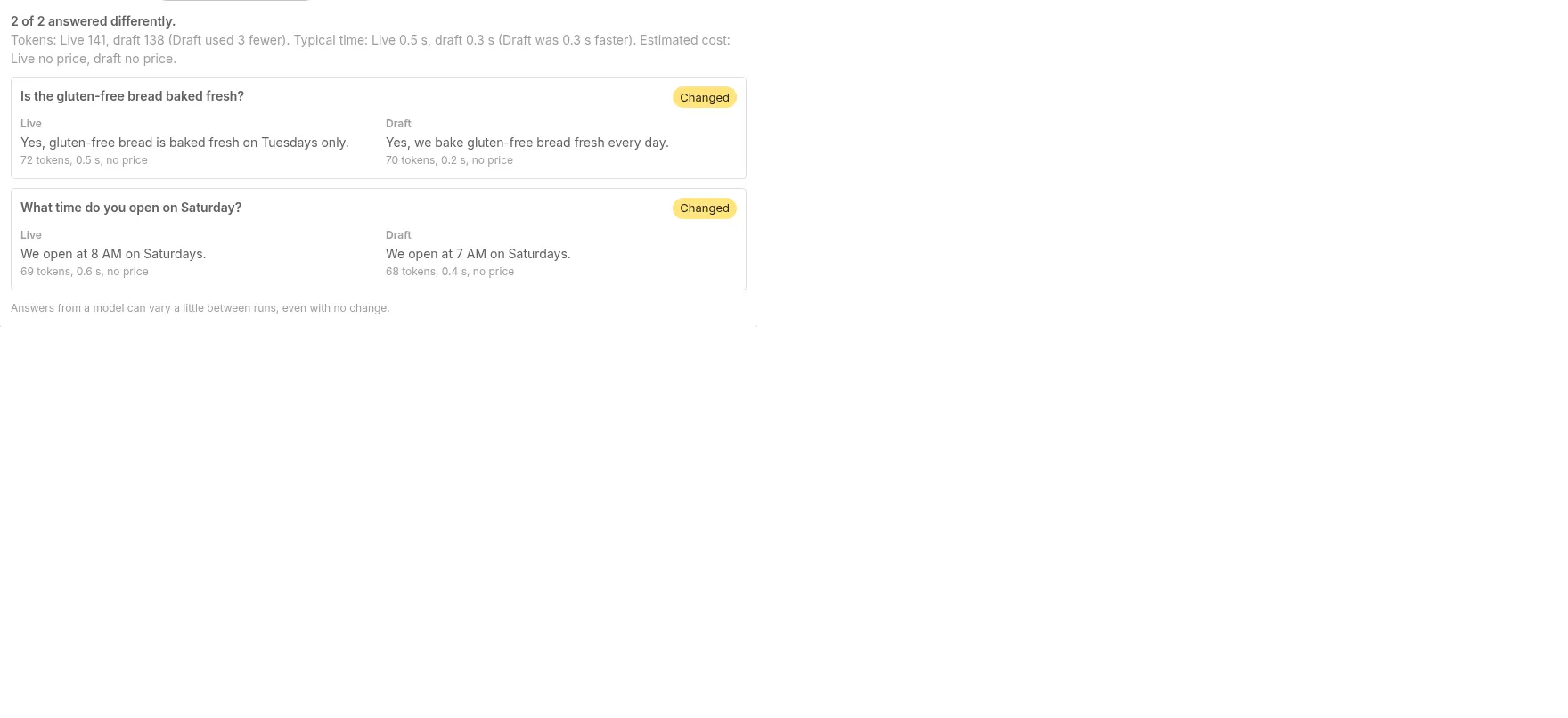
Section titled “In the Publish check”Before you publish a chatflow, an agentflow, or a harness, the Publish dialog can ask recent questions again, once on Live and once on your draft. Each question shows the two answers side by side, with the tokens, the time, and an estimated cost under each. The summary shows the token total, the typical time, and the estimated cost for Live and for the draft. The cost is an estimate in US dollars from the current model prices. The total groups that side’s tokens by model and prices each model once. The figure under one answer can differ from the total by one hundred-millionth of a dollar. A model with no price is shown as no price, not as zero.
Those tokens are the total the check counted for that side. The check does not split them into input, output and cached on the dialog, and it does not show the route, specialist and handoff times. Those stay on the run card and in the API response. The estimate uses the input and output tokens each model reported. On a harness those are the route, specialist, and handoff lines stored under the harness name, grouped by model.
How to read the cost lines is in Read the check cost. The dialog is in Check recent questions before you publish.
Usage over time
Section titled “Usage over time”A finished run also adds its input and output tokens to a daily total. The total is kept per workspace, per flow, per model, and per UTC day. A chatflow, an agentflow, a Multi Agents canvas, and a Sequential Agents canvas are stored under that flow’s id. The canvas test chat on those flows is a finished run, so it counts. Those canvases count the model calls the graph already reports. A harness run started from the harness API, a harness canvas draft try, and a harness publish-check replay is stored under the harness name. Each of those is that same write, once. A chatflow whose only node is a harness stores the team’s route, specialist, and handoff tokens on that chatflow. A chatflow whose Tool Agent calls the harness tool stores those same tokens on the chatflow: the tool’s answer text does not carry them, so the tool records the payload when it returns. The harness model calls are not also added by the chatflow counter. The harness name is not given a second copy. An Agent step that calls tools adds each model call’s input tokens and output tokens, including a structured-output conversion and a memory summary. The step’s cost and the token total on the execution chip use that same sum. A specialist that fails while the harness still returns an answer is part of that finished run, and the tokens that specialist reported are included. A run that did not report token counts adds nothing. Saving the total never changes the answer: if the write fails, the run still returns.
The daily total is written only when the run finishes. A run that errors after the model has already answered is not included. A chatflow whose run throws, a harness run that throws, and an agentflow that ends in an error or is cancelled leave those tokens off the total. A run that stops for human input is not included until it finishes. That covers an agentflow tool approval and a Sequential Agents tool interrupt. The interrupt writes the waiting action onto the chat message before it is streamed, so an approval sent as soon as that action arrives still includes the earlier model calls. When that run finishes, the total includes the model calls from before the approval as well as the calls after it. The resume reads that saved action and does not use usage sent on the request. If the resume cannot read the saved action, or the action has no saved id, the resume fails and no partial total is written. An agentflow Agent that calls a harness adds that harness payload to the same flow total as the Agent’s own calls. A knowledge pipeline run is not added.
A publish check counts toward usage. Replaying a question before you publish spends tokens, and those tokens are added to that flow’s daily total.
Estimates
Section titled “Estimates”GET /api/v1/stats/usage returns those totals for the caller’s workspace, plus an estimated cost for each day, each flow, each model, and the whole range. The caller needs chatflows:view or agentflows:view. The organization owner is allowed without those keys. The range is the last 7, 30, or 90 UTC days (days, or range as 7d, 30d, or 90d), or a custom startDate and endDate. range cannot be combined with days or those dates. You can filter with flowId and model. The response has one row per day (including days with zero tokens), a total per flow, and a total per model. The reference is Usage API.
The dollar figures are estimates. They are computed when you read the route, from the prices in effect then, not from a price stored with the tokens. Changing a price changes the estimate for days already recorded, the next time you read them. The figure is not an invoice from the model provider. Each estimate counts hundred-millionths of a US dollar, and a half unit rounds up. A model with no price is no price, not zero, and those tokens are left out of a partial total. A price of 0 is a known price: those tokens add $0.
Prices are US dollars per million tokens. The model list stores a default as US dollars per token, and the estimate multiplies that by 1,000,000. An organization owner can replace one model’s input and output price. The override belongs to the organization, so every workspace in it uses the same prices. The token rows stay with the workspace: one workspace’s total does not include another workspace’s tokens, and it does not use another organization’s prices. A harness line is stored as the node label, a middle dot, and the catalog id, for example ChatOpenAI · gpt-4.1-mini. An override on that full string wins. Otherwise the price is the catalog id after the last ·. Two model names that differ only by case stay two rows and are priced apart.
Set a price
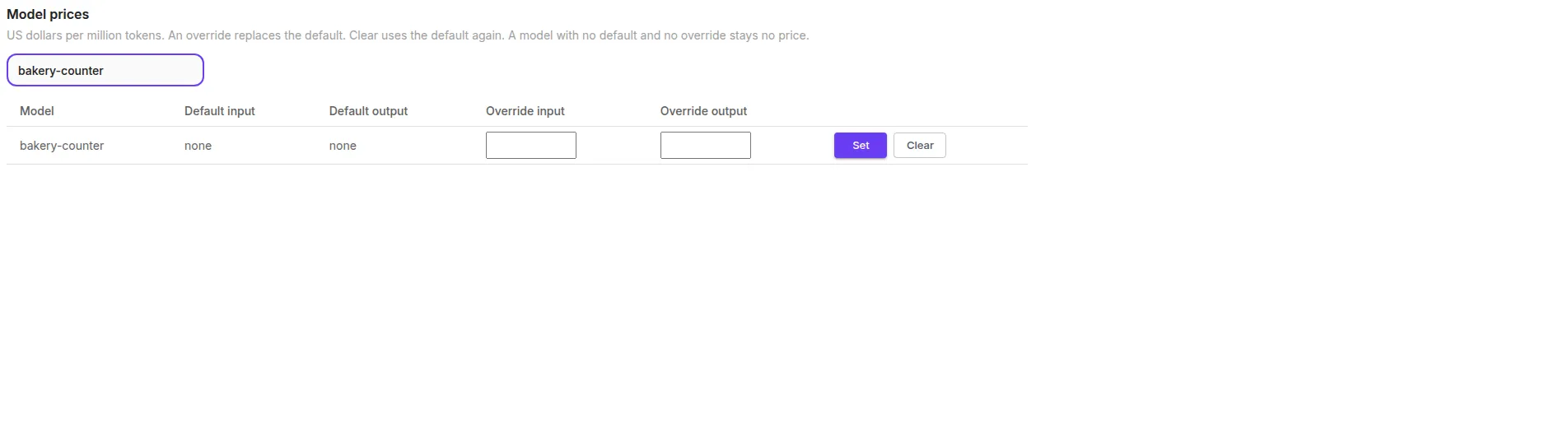
Section titled “Set a price”On the Usage page, Model prices is the editor. It is shown only to the organization owner. Each row is a model from the model list, or a model that already has an override, or a model in the current totals that has no price. Default input and Default output come from the model list. none means the list has no price. Type an override in US dollars per million tokens, from 0 to 1000000, with at most 8 decimal places, and select Set. Clear removes the override and the estimate uses the default again. A model with no default and no override stays no price. Find a model narrows the list. Anyone who is not the organization owner does not see this section.
The same writes are PUT /api/v1/model-prices and DELETE /api/v1/model-prices. Only the organization owner can call them. An API key is refused. The fields are in Model prices.
Read the Usage page
Section titled “Read the Usage page”Open Usage in the sidebar, or go to /usage. The sidebar shows it for a role with chatflows:view or agentflows:view, the same rule as the route. A role with neither key does not see the menu entry, and the route returns 403.
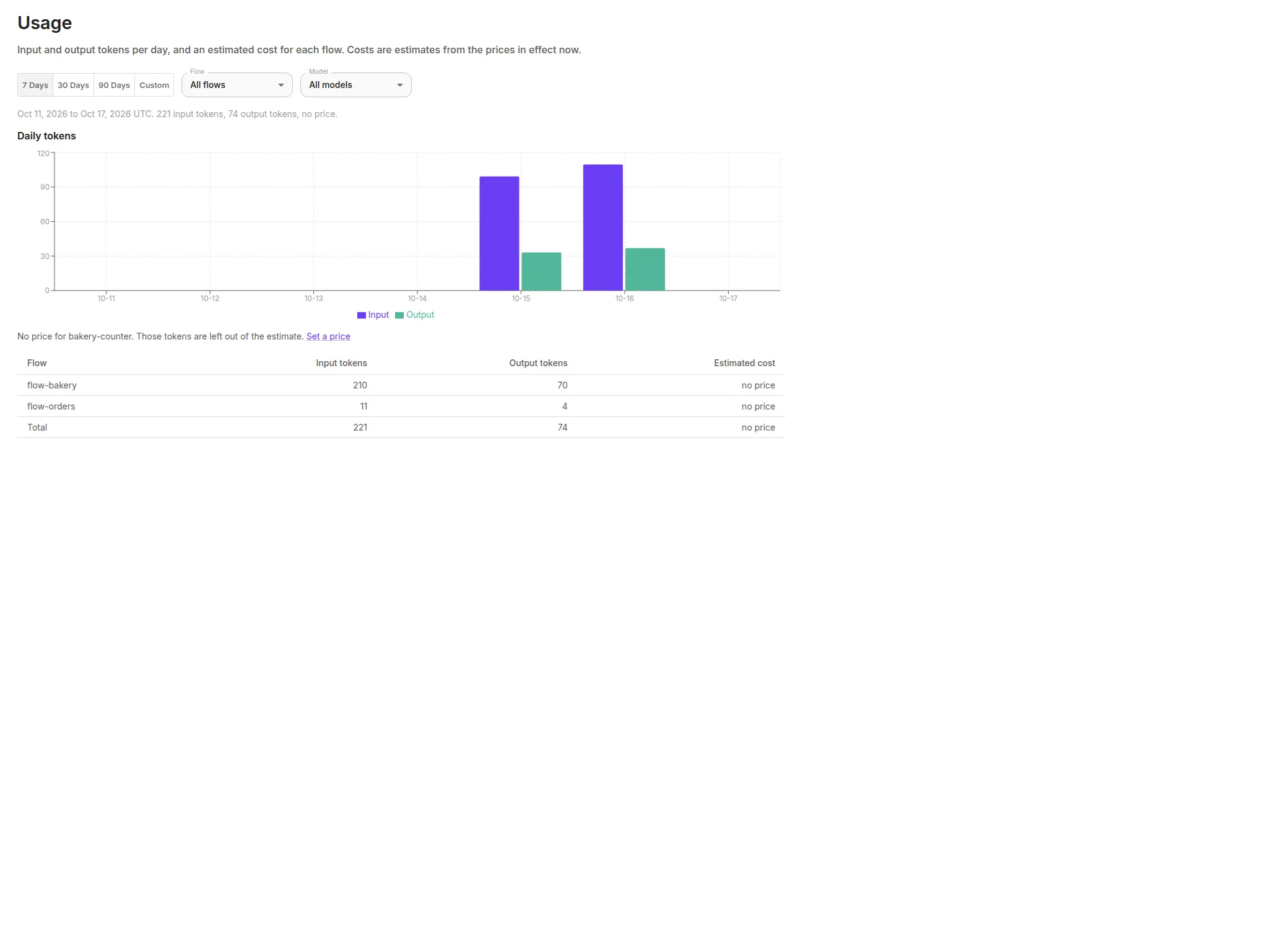
The page opens on the last 7 UTC days. The buttons read 7 Days, 30 Days, 90 Days, and Custom. Custom asks for a start date and an end date, at most 366 days, and the end must be on or after the start. Flow and Model narrow the chart and the table. Each label sits above the selected value. All flows and All models clear those filters. The line under the filters names the window and the input tokens, output tokens, and estimated cost for that view.
Daily tokens is a chart of input and output tokens for each UTC day, including days with none. The table lists each flow that has tokens, then a total. A known price is a dollar figure. A partial row is the priced models only, and the cell says some models have no price. A row with no price says no price, not $0. When a model in the view has no price, a line above the table names it and says those tokens are left out of the estimate. The organization owner also gets a Set a price link to the editor.
When nothing has been recorded, the page says No usage yet and Usage is recorded from finished runs. A filter that matches nothing says No usage for this filter in the selected range.
Read the check cost
Section titled “Read the check cost”Before you publish, the check shows an estimate for Live and for the draft. The summary line names the token total and the typical time, then Estimated cost. Each side is estimated plus a dollar figure, no price, or estimated plus a dollar figure and (some models have no price). Under each answer the same estimate sits after the token count and the time, for example 69 tokens, 1.0 s, estimated $0.0000276. A side with no price reads no price in that same place, not $0.
The total groups that side’s tokens by model and prices each model once. The figure under one answer is priced on its own, so it can differ from the total by one hundred-millionth of a dollar. On a harness the lines are the route, specialist, and handoff tokens stored under the harness name. The dialog is in Check recent questions before you publish.